本頁面暫無您所用語言的版本,您正在閱讀英文原文。
Knowledge base
Choose the browser engine
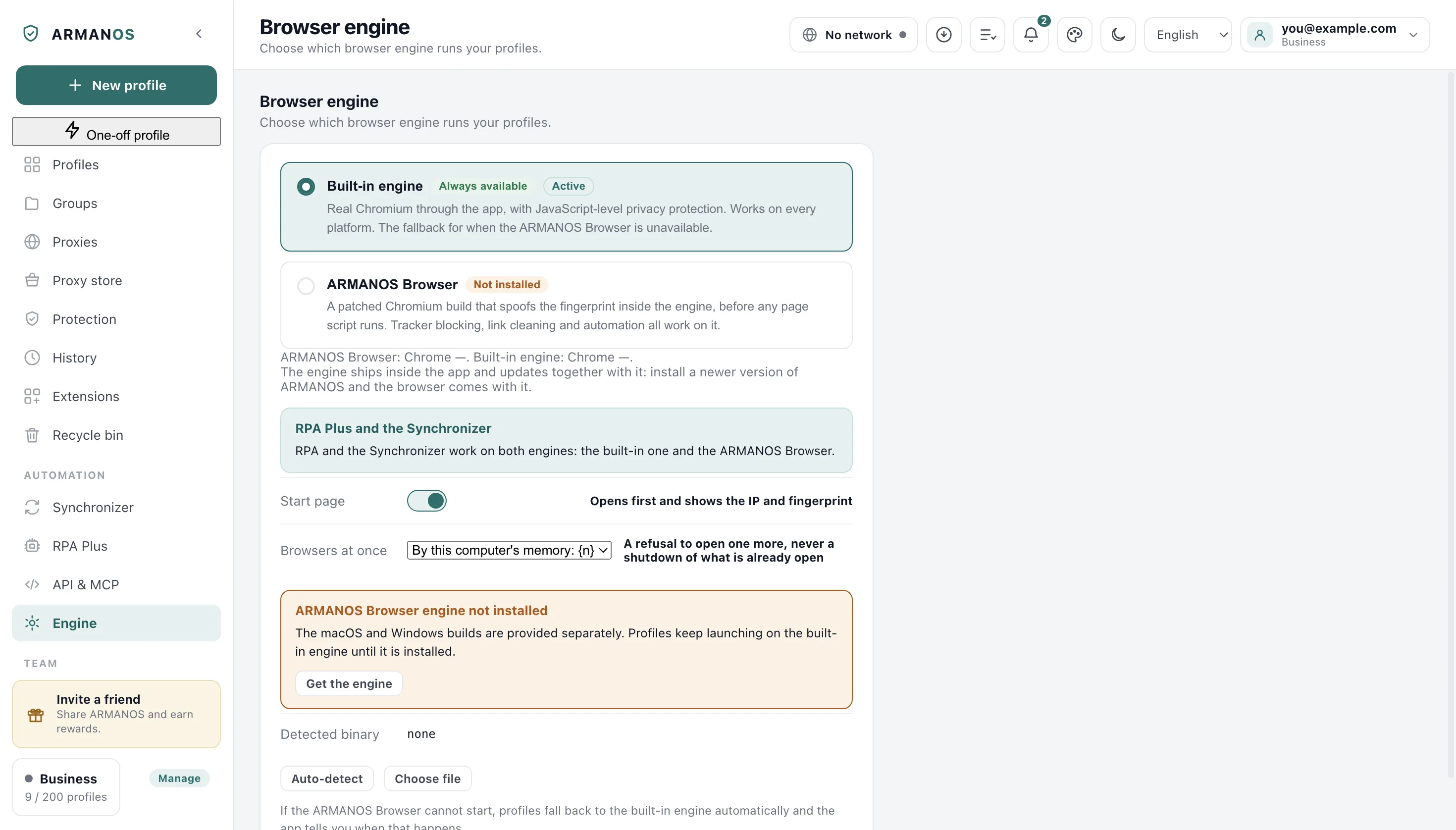
Two engines
The built-in engine is the Chromium that runs inside the app, and it changes the fingerprint with scripts placed into the pages. It works on any system the app runs on and is the fallback when ARMANOS Browser is missing.
ARMANOS Browser is a patched Chromium build that changes the fingerprint inside the engine, before any page script runs. Tracker blocking and link cleaning work on both.
A line under the cards gives the Chrome version of both engines. When the built-in one is in use and trails far behind, a warning says so and suggests switching.
What the program picks by itself
When the program starts and you have not picked an engine yourself, it looks for ARMANOS Browser and selects it if found. Otherwise it stays on the built-in engine and looks again at the next start.
The engine ships inside the app and updates together with it. Once you switch engines on this screen, the choice is yours and the program stops choosing for you.
Switching engines
Each engine keeps its own logins, so after a switch your profiles open without the logins they have now. Switch back and the sessions are there again, because nothing is deleted.
- 1
Open Engine
In the left column, under Automation.
- 2
Press the card of the other engine
The whole card works as the button.
- 3
Answer the question about logins
Saying no leaves everything as it was.
When ARMANOS Browser is not found
If ARMANOS Browser is chosen and the program cannot find it, profiles open in the built-in engine. Its card then reads “Chosen, but not installed: profiles still open in the built-in engine.” and the Active mark moves to the other card.
A box further down adds Get the engine, which opens the download page in your browser.
Launching a profile while the engine is missing brings a notification titled Engine switched, which names the profile and warns that sites see a different browser version. If the engine is found but fails to start, the profile also opens in the built-in engine, and the same notification names the reason. A profile already open in ARMANOS Browser gets a refusal instead, and so does a profile whose password bridge for a proxy with a login did not start: the fault is in the proxy, not in the browser.
Pointing at the file yourself
Detected binary shows the file the program will run, or none. Auto-detect looks again, and Choose file takes the program you point at, on a Mac the app bundle itself.
The chosen file is run once and saved only if it answers with a browser version. Otherwise a message says why it was not saved.
A saved file appears as Configured path, and from then on the program stops searching: if the file disappears, ARMANOS Browser counts as not installed. Reset to auto drops the saved path and brings the search back.
Browser kernels
A site can read the browser version, and an update changes it for all your profiles on the same day. A kernel is another ARMANOS Browser version kept beside the main one, so a profile can stay on it.
To add one, type its version in the field on the Browser kernels card, press Install from folder and pick the folder where you unpacked the build. The kernel is copied into the app, so tidying your Downloads breaks nothing.
Then choose that version under Browser kernel in the Edit profile window, where Default means the engine this screen found. The pin is read by ARMANOS Browser, and the built-in engine ignores it.
A pinned kernel that is missing
The card lists the kernels with their size and the profiles using them, and Remove turns down a kernel a profile is pinned to. A pinned version missing from this computer is named in red at the top of the card, with the profiles waiting for it.
On ARMANOS Browser such a profile still opens, on a different browser version, and a notification titled Selected browser kernel is not installed says so. Install the kernel or set the profile back to Default.
Other settings on this screen
Start page decides whether a profile first opens a page with its IP and fingerprint. Browsers at once caps how many profiles are open together, counted from this computer's memory unless you pick a number, and reaching it refuses one more without closing any.
What this does not do
- It does not move logins between engines. Each engine keeps its own, and they come back when you switch back.
- It does not download ARMANOS Browser. Get the engine opens the download page in your browser.
- It does not fetch kernels. A kernel is installed from a folder you unpacked yourself.
- It does not pin a version on the built-in engine. The pin is read by ARMANOS Browser alone.
Where this is decided
The claims that carry the most weight, with the stand that checks each of them.
- Both engine cards warn about logins before a switch
- apps/desktop/test/engine-pin.js
- A pinned kernel that is installed is the one launched, and a missing one is reported rather than swapped quietly
- apps/desktop/test/kernels.js
- The missing kernel warning reaches the notification list and reads in the app's languages
- apps/desktop/test/предупреждения-движка-видны.js
- A kernel installs whole or not at all, and one a profile is pinned to is not removed
- apps/desktop/test/ядро-ставится-целиком-или-никак.js
- With ARMANOS Browser chosen and missing from the disk, a profile opens in the built-in engine with a notification, not quietly
- apps/desktop/test/движок-и-api-говорят-правду.js
- An installer is not packed without the engine unless the build says so out loud
- apps/desktop/test/установщик-без-движка.js
Questions
- Which engine should I use?
- ARMANOS Browser wherever it is installed. The built-in engine is the fallback, and while it is in use the screen warns when its Chrome is much older than ARMANOS Browser's.
- Why is the Active mark on the built-in card?
- Either the built-in engine is chosen, or ARMANOS Browser is chosen and not found. The mark follows the engine that really opens profiles.
- My profiles opened logged out after a switch.
- Each engine keeps its own logins. Switch back and they are there, since nothing was deleted.
- Is Browser kernel in the profile window the same as the engine?
- No. The engine is chosen here for all profiles, and Browser kernel pins one profile to a kernel version of ARMANOS Browser.
- Where does Auto-detect look?
- In the app's own engines folder, in the copy that came with the installer and in the usual place for your system: Applications on a Mac, Program Files or your local app data on Windows, the opt folder on Linux.
See which engine opens your profiles
The free plan gives two profiles, with no time limit and no card.