Search and filters
Finding one profile among a thousand
- Name, imported group label, scenario, tags, proxy address, notes, ID
- What the box matches
- State, system, exit country and exit IP, kernel, proxy, tags, status, last run, scenario, password
- Filters behind the funnel
- 10, 25, 50 or 100
- Profiles on a page
- On this computer
- Where the search runs
What the search box reads
Past a hundred profiles the names stop telling them apart. Half of them are Account 17 with a different number on the end.
So this is not a name search. With one line of letters you hit seven things on every profile at once, and a piece of a word is enough.
The name
What you typed at creation, or the number a batch gave it.
The scenario
The label shown on the card, not the internal word behind it.
The tags
Every tag on the profile, as one line of text.
The proxy address
The host and the port this profile goes out through.
A group label that came by import
Plain text on the profile, not a group you made in Groups.
The notes
Any word on any line of them.
The profile ID
Whole, or any piece of six characters or more.
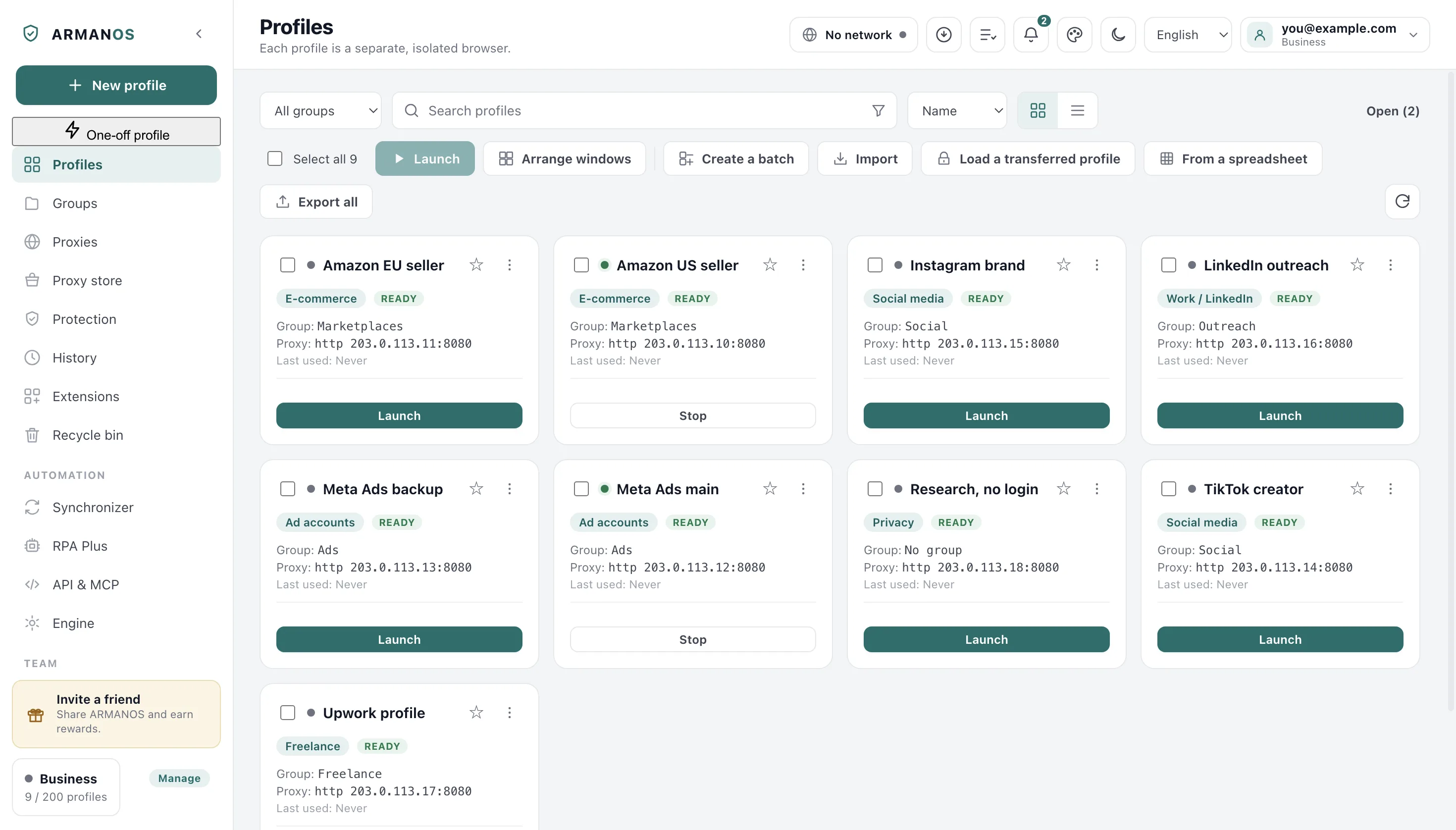
The proxy address is in the same box
A profile is often remembered by where it goes out, not by its name. Part of a host is enough to pull up every profile behind that address.
This is what makes Show profiles on a library row a real filter: the host goes into the same box and you land on the narrowed list.
Filters and chips above the list
The funnel asks narrow questions, and its button shows how many fields are on. Each field that is on also stands above the list as a chip with a cross, next to Shown 12 of 340.
Values inside a field combine with or, fields combine with and. Clear filters under an empty result also resets the box and the group.
| Filter | What it asks |
|---|---|
| State | Running right now or idle, read from the live set of running profiles |
| System | The fingerprint template, for example macOS · Chrome |
| Exit country | Country of the last confirmed proxy check, Not checked yet or No proxy |
| Exit IP contains | A part of that address |
| Browser kernel | Default or an ARMANOS Browser version |
| Proxy | Configured, none, or not applied because the port or kind is unusable |
| Scenario | The scenarios your profiles carry |
| Tags | Any or all of the ticked, or No tags; the whole tag, so ads skips adsense |
| Password | With password or Without password |
| Status | Your work stages or No status |
| Last run | Never, In the last 7 days or More than 30 days ago |
A group is filtered by clicking it
Groups are not typed into the box. In Groups you click one and land on the list already narrowed to it.
A chip in the toolbar then carries the group colour and the cross that removes it. No group is a choice of its own, because the profiles nobody filed are the ones worth finding.
Numbers in names sort as numbers
A batch of fifty gets a series of names, and ordinary text order takes that series apart.
- Ordinary text order
- Work 1, Work 10, Work 11, Work 2, Work 20, Work 9
- The order you get here
- Work 1, Work 2, Work 9, Work 10, Work 11, Work 20
You get the names in the order their digits take as numbers, so Work 10 never sits between Work 1 and Work 2.
- 1
By name
The series order above, and the one the list opens with.
- 2
By newest
Creation date, which is how a batch made this morning comes up together.
- 3
By last used
A profile never opened sorts as never, not as today.
- 4
The other way
Clicking a column already sorted reverses it instead of starting over.
Two views and how many per page
Cards carry the whole profile at a glance: group, address, tags, Safe pace. The table gives every field a column of its own, and three of those reorder the list on a click.
Then 10, 25, 50 or 100 rows sit on a page, with the total and the page number under the list. Select all takes the whole found set across every page and not the page in front of you.
The star on a card, Pin to the top, lifts the profile to the top of the list in any order and direction, and inside the pinned ones the order you chose above still holds. In the table a pinned profile carries the star in its row, and you can unpin it right there.
When nothing is found
An empty result is its own state, with that one button under it. It is not the same screen as a list with nothing in it yet, and the difference matters on the day you filter to a tag you already deleted.
What this does not do
- It does not search your account. You search the list this computer holds, so a profile made on another machine is found here only after the app has checked with your account.
- The box does not read the name of a group made in Groups, and skips ID pieces under six characters.
- It matches letters, not meaning. Typing ads brings up a profile tagged adsense, a tag spelled two ways stays two tags, and nobody corrects it for you.
- The view, the order, the page size and the star on a card stay on this computer. Your account does not carry them to your other machines.
How to check
The stand below runs the window's own filtering code instead of reading the file and hoping.
- The box matches the name, the scenario, the tags, the proxy address, the notes and the ID
- apps/desktop/src/manager/поиск-профилей.js · apps/desktop/test/поиск-и-отборы.js · apps/desktop/test/номер-профиля-копируется.js
- The filters narrow one list, the funnel counts them, and a tag filter takes the whole tag
- apps/desktop/src/manager/renderer.js · apps/desktop/test/поиск-и-отборы.js
- The new filters narrow to exactly the expected profiles, and the chips come off one at a time
- apps/desktop/src/manager/отбор-списка.js · apps/desktop/test/отбор-в-окне.js
- Numbers inside names compare as numbers, and reversing an order leaves the list underneath alone
- apps/desktop/src/manager/renderer.js · apps/desktop/test/поиск-и-отборы.js
- A star survives a restart
- apps/desktop/src/lib/profiles.js · apps/desktop/test/pinned-and-temporary.js
Questions
- Why does typing my group name find nothing?
- A group made in Groups is filtered by clicking it rather than typed. A group label that arrived inside an imported file is plain text on the profile, and the box does read that.
- Does a filter decide what a bulk action touches?
- Yes, that is why you narrow first. After a filter leaves ten, Select all takes those ten across every page, not the other ninety. A profile ticked before the filter stays ticked, and the action reaches it.
- How do I see every profile behind one address?
- Press Show profiles on that row in the proxy library. The host goes into the search box, so the list you land on is the answer, and the button is dead when nobody uses the address.
Type three letters instead of scrolling
In ARMANOS, paste part of a proxy host into the search box and see every profile behind that address.