Solutions
For developers
- 127.0.0.1:50325
- Default local API address
- 26
- Distinct routes on the local API
- 10
- MCP tools
- 8
- API key scopes
- 13
- Webhook events
Your code drives a real profile
A script that opens a plain Chromium starts from the machine it runs on: its screen, its fonts, its graphics string, its clock.
An ARMANOS profile carries the device with it, on one of five templates, and the values are substituted inside the engine rather than painted over the page.
A user data directory divides cookies and cannot do that.
How this is usually solved
The usual answers are an incognito window, a fingerprint extension, or a virtual machine per account.
Each stops at a different place, and the one that stops nowhere costs a laptop of memory per identity.
| What you need | Incognito window | Spoofing extension | Virtual machine | ARMANOS profile |
|---|---|---|---|---|
| Cookies and storage kept apart per account | – | – | Yes | Yes |
| Fingerprint changed below page JavaScript | – | – | Yes | Yes |
| Its own proxy, not the machine's | – | browser-wide | Yes | Yes |
| Ten accounts open at once on a laptop | – | – | as much RAM as you have | Yes |
| Your code attaches to exactly one of them | – | – | Yes | Yes |
| Opens in about a second | Yes | Yes | – | Yes |
The local API answers programs only
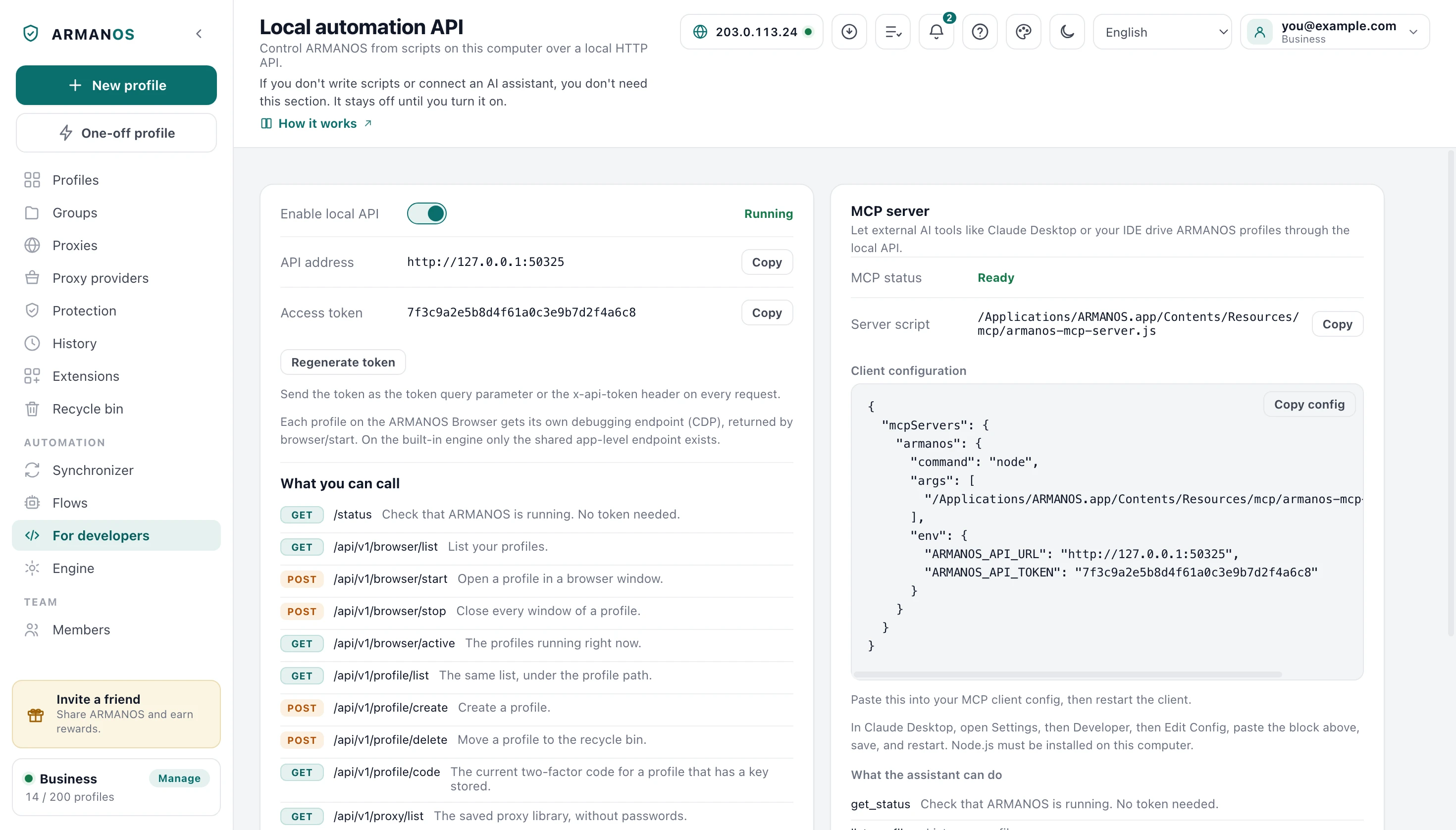
Switch on Enable local API under For developers in the left column. The server binds to loopback and to nothing else, and it stays off until you switch it on.
On first run the app writes an access token of 24 random bytes next to its data, readable by your account alone.
Loopback is not a boundary on its own, because the pages a person visits run on this machine too. A request carrying an Origin header, a foreign Host, or a Sec-Fetch-Site other than none gets 403.
That check runs before the status route, which names the product and its exact version.
| Route | Method | What it does |
|---|---|---|
| /status | GET | No token needed. Ready, and the app version. |
| /api/v1/profile/list | GET, POST | Every profile, or one filtered and ordered page, with scenario, group, template, proxy, notes and state. |
| /api/v1/browser/list | GET | The same profiles, each with the state it is in now. |
| /api/v1/profile/quick | POST | Creates a one-time profile and opens it; it is deleted when it closes. |
| /api/v1/browser/start | POST | Opens the profile, returns its debugging endpoint. |
| /api/v1/browser/stop | POST | Closes every window of that profile. |
| /api/v1/browser/active | GET | The ids of profiles open right now. |
| /api/v1/profile/create | POST | Creates a profile through the quota gate; without presetId the default template fills it, presetId none skips it. |
| /api/v1/profile/update | POST | Changes only the fields you send. |
| /api/v1/profile/delete | POST | Moves the profile to the recycle bin. |
| /api/v1/profile/code | GET | The current two-factor code of that profile. |
| /api/v1/profile/unlock | POST | Opens a profile closed with a password, for one launch or until ARMANOS closes. |
| /api/v1/profile/lock | POST | Closes a password-protected profile again at once. |
| /api/v1/profile/password | POST | Sets or changes the password of a profile. |
| /api/v1/profile/password/remove | POST | Removes the password, given the current one. |
| /api/v1/profile/cookies | GET | Cookies of one profile, as JSON or Netscape text. |
| /api/v1/profile/cookies/export | POST | Cookies of up to 100 profiles, with an answer for each. |
| /api/v1/profile/cookies/import | POST | Loads cookies into a profile, open or closed. |
| /api/v1/profile/export | POST | Settings in the answer or full archives with the session, up to 100 profiles. |
| /api/v1/profile/import | POST | Brings profiles back from settings or archives, with an answer for each. |
| /api/v1/proxy/list | GET | The saved proxy library, without passwords. |
| /api/v1/preset/list | GET | Templates of this computer, for presetId in profile/create. |
| /api/v1/flow/list | GET | The flows here and their step counts. |
| /api/v1/flow/run | POST | Runs a flow across the profiles you name. |
| /api/v1/app/state | GET | Whether the program is signed in and as whom, the engine, open profiles and the video card. |
| /api/v1/app/login | POST | Signs the program in with a Dashboard code, email and password, or an account key. |
Every profile has its own endpoint
A start goes through the same path as the button in the window, and one run can skip the window without touching the profile's own Run without a window (for automation) tick box.
On ARMANOS Browser the answer is a debugging endpoint that belongs to that profile alone. Chromium takes a free port on loopback and writes it into the profile's directory, and the app hands you that address if it could read it within 4.5 seconds.
Opening a debugging port normally sets navigator.webdriver to true, which announces automation on the first line of most checks. Here it stays false, and a stand reads the value from a real page in the real engine.
On the built-in Electron engine one debugging port serves the whole app, so the answer returns ws as null.
- 1
Turn the local API on
For developers in the left column, the Enable local API switch. The Access token is on the same screen.
- 2
Ask for the profile
A start request with the profile id and the token.
- 3
Read the ws address
The port and path of this profile and no other, when the engine wrote them within 4.5 seconds.
- 4
Attach and work
Fingerprint, cookies, extensions and proxy are already in place.
Two calls and one caveat
Ask the local API to start the profile, take the ws address from the answer, and hand it to puppeteer.connect or to Playwright as connect_over_cdp.
Both clients enable the Runtime and Page domains when they attach, and Chromium then installs hooks a page script can notice. That is a property of the client, not of ARMANOS Browser.
Our own runner does not enable the Runtime domain. During a run it enables the Page domain on the run's tabs, to answer a page's alert or confirm, and the Network domain from the first request-wait step, and readiness is polled through document.readyState.
The Flows screen in the app has nineteen kinds of step, with repeat, branch and list loop nested up to four levels deep. Navigation is limited to http, https and about:blank, checked when a flow is saved and when it runs.
Two clients in the repository
A Node client and a Python client ship in the repository, the Python one on the standard library alone.
They wrap the server API and add no logic of their own, because a client that knows more than the server starts to lie within a month.
Every error carries the HTTP status and a typed code, so a lost connection and a rejected key are told apart. Both clients verify a webhook signature and refuse anything older than 300 seconds.
- profiles.list() / profiles_list()
- GET /profiles
- profiles.search() / profiles_search()
- POST /profiles/search
- profiles.create() / profile_create()
- POST /profiles
- profiles.start() / profile_start()
- POST /profiles/{id}/start
- proxies.update() / proxy_update()
- PATCH /proxies/{id}
- logs.suspicion() / logs_suspicion()
- GET /logs/suspicion
- verifyWebhook() / verify_webhook()
- HMAC-SHA256 over timestamp.body
Every path these clients call is checked against the generated reference, so a renamed route fails the build.
Ten tools over MCP
The MCP server is a single Node file with no dependencies, started by your client rather than by the app. It speaks JSON-RPC 2.0 over stdin and stdout, and two environment variables point it at the API.
Ten tools, each mapped to one route the local API really implements.
get_status
Reachable, and the app version.
list_profiles
Every profile or one filtered page, without notes.
get_active_profiles
The ids open right now.
launch_profile
Opens a profile, returns its debug port.
stop_profile
Closes every window of a profile.
create_profile
Creates a profile with group and proxy.
update_profile
Changes only the fields you send, fingerprint values set by hand, the site login and the 2FA key included, without notes in the answer.
delete_profile
Moves a profile to the bin.
get_one_time_code
The current two-factor code.
list_proxies
The proxy library, without passwords.
API keys and their rights
A key is a door into the account without a password, so the secret is shown once and the server keeps only a hash and a ten-character prefix.
Rights are checked per endpoint and the default is closed. An endpoint that declares no right is unreachable with a key at all, and 18 endpoints are open to keys today.
Keys belong to the paid plans, and the plan is read on every request. Webhooks go the other way and are managed only by a person logged in with a password.
| Right | What a key holding it may do |
|---|---|
| profiles:read | List profiles with scenario, group and template, and search among them. |
| profiles:write | Create, edit and delete profiles. |
| browser:run | Take and release the profile claim, and record opens and closes. |
| proxies:read | List the proxy library. Passwords sit behind an endpoint no key can reach. |
| proxies:write | Add, edit and delete proxies in the library. |
| flows:read | List the flow library. Changing it needs a manager. |
| logs:read | Read the logs, the sign-ins and the suspicion rules. |
| app:signin | Sign the ARMANOS app in on a server, as a device that takes a seat. Not given by default. |
Thirteen events to your server
The thirteen events cover the life of a profile, the shared proxy library, keys, the team and the plan.
Each delivery carries the event, the timestamp and a signature over the timestamp, a dot and the body you received. Fields that look like a code, token, secret, password or hash never leave.
Sending is defensive: ten seconds per attempt, three attempts, no redirects, and a retry only on 5xx and 429. Fifteen consecutive failures switch the subscription off with the reason written down.
Ceilings and the reference
One ceiling covers the whole server API: 300 requests per 60 seconds, with the sign-in surface tighter at thirty a minute.
There is no per-plan rate limit. Your plan decides how many profiles, devices and seats you get, not how fast you may call.
The reference is generated from the same controllers that serve the requests, so it cannot promise a route that does not exist. The note about rights on each endpoint is read from the annotation in the code.
- Server API, all endpoints
- 300 requests / 60 seconds
- Sign-in and password routes
- 30 / minute, two of them 10 and 3
- Support messages
- 8 / 10 minutes
- Local API on your machine
- no limit, request body up to a million characters, 16 MB for loading cookies, a one-time profile and profile import
- MCP reply size
- 5 MB, then a clean error
- API keys per account
- 20 live at a time
- Webhook subscriptions
- 10 per account
- Flows on one machine
- 200, up to 500 steps per list
Every number here is read from the code that enforces it, and the files are named below.
What this does not do
- There is no cloud that opens a browser for you. Profiles run on your machine, through the app. The server API creates, edits, shares and locks profiles, and never launches one.
- API keys are a paid feature. On the Free plan the server refuses to issue one, and a key whose plan has lapsed gets 402 rather than silence.
- The two clients are version 0.2.0 and live in the repository. Neither is published to npm or PyPI yet, so today you copy the file into your project.
- We cannot stop an external Puppeteer or Playwright client from enabling the Runtime and Page domains when it attaches. If the site you work with looks for that, build the sequence in the app instead.
- There are no per-plan rate limits. One ceiling of 300 requests a minute applies to everyone, so pacing a large fleet is your own work.
- A key cannot manage webhooks, change the flow library or read a proxy password: those endpoints declare no right. They take a person's or the app's sign-in, and the app signed in with a key holding app:signin cannot touch webhooks, keys, the team or billing.
How to check
Every claim above sits in a file you can open, and most of them are held in place by a stand that runs the real code.
- The local API answers programs and refuses web pages
- apps/desktop/src/lib/local-api.js · apps/desktop/test/local-api-gate.js
- Opening the debugging port does not set navigator.webdriver
- apps/desktop/src/lib/forkEngine.js · apps/desktop/test/webdriver-flag.js, which on a machine with ARMANOS Browser installed launches the real engine and reads the value from a real page
- Our own runner does not enable the Runtime domain
- apps/desktop/src/lib/cdp.js · apps/desktop/test/области-отладки.js
- The MCP server is one file with no dependencies, and its path survives a restart
- apps/desktop/src/mcp/armanos-mcp-server.js · apps/desktop/test/путь-mcp-переживает-перезапуск.js
- Keys are hashed, scoped, and refused on the free plan
- apps/server/src/api-keys/api-keys.service.ts · apps/server/src/auth/api-key.guard.ts · apps/server/test/ключ-хранится-отпечатком.js · apps/server/test/ключи-платные.js
- The reference matches the running server, and both clients run against it
- packages/sdk-js/index.js · packages/sdk-python/armanos.py · apps/server/src/openapi/openapi.ts · apps/server/test/sdk-and-openapi.js
- Webhook deliveries are signed, retried, and visible when they fail
- apps/server/src/webhooks/webhook-dispatch.service.ts · apps/server/test/webhooks.js
- The ceilings on this page are the ones the code counts
- apps/server/src/app.module.ts · apps/desktop/src/lib/local-api.js · apps/desktop/src/lib/rpa.js
- Profile search on the server sees only what the rights open, and both clients pass its arguments
- apps/server/test/api-список-профилей.js
- The app signed in with a key holding app:signin issues no keys, cannot touch webhooks, the team or billing, and cannot read the account logs; the server records this decision for all of its endpoints
- apps/server/src/auth/вход-ключом-перепись.ts · apps/server/test/вход-ключом-устройства.js · apps/server/test/вход-ключом-перепись.js
Questions
- How do I pass the token?
- As the token query parameter, as the x-api-token header, or as Authorization: Bearer. A new one from Regenerate token takes effect at once, with no restart.
- How do I tell key refusals apart?
- 401 for a key that is invalid or revoked, 402 for a real key whose plan has lapsed, 403 for a real key missing a right.
- What machine does the client register as?
- As sdk@hostname unless you say otherwise. The claim on a profile and the device count of your plan both need machines to be distinguishable.
- Why can a launch through MCP be slow?
- The tool waits up to ninety seconds, because the engine opens its debugging port at its own pace and a shorter wait answers before the window is up.
- Can a web page call the local API?
- No. A request that carries an Origin header or a foreign Host gets 403, and a domain rebound to loopback is exactly what that check is for.
- Does the debugging endpoint survive a close?
- No. It exists only while the profile is open, and the next start hands you a new one.
Read next
Automation
Runnable Puppeteer and Playwright examples, and the caveat in full.
What the app can do
The nineteen step types on the Flows screen, and the rest of the window.
The engine
What ARMANOS Browser changes inside Chromium.
Pricing
Which plans include API keys, seats and devices.
Check every claim
How the claims on this site are checked, and by what.
Build against it today
The app is free for two profiles, and the local API is part of every plan, including that one.