ARMANOS

From an empty machine to a working team

How it all works

One walkthrough in ten chapters: what the installer puts on disk, what a profile actually is, what happens in the seconds between the button and the window, and how one person runs fifty of them without opening fifty forms.
153.0.7978.0
ARMANOS Browser, the engine inside the installer
5
fingerprint templates, from desktop to Android tablet
20
platforms named by the five scenarios
16
step kinds in the automation builder
2233
automated checks: 1602 app, 440 server, 191 site

The installer carries the browser, not a link to one

There are three systems and four files. macOS 13 and later gets two disk images, one for Apple Silicon and one for Intel, because Rosetta cannot run an arm64 build on an Intel Mac. Windows 10 and 11 gets one 64-bit installer. Ubuntu 22.04 and later gets an AppImage.

Inside each one is ARMANOS Browser 153.0.7978.0, our own Chromium build, with the fingerprint substitution compiled into the engine rather than pasted into the page. The window you browse in is a separate process. The app you see is the manager around it: the profile list, the proxy library, the scenarios, the automation.

The Electron engine that shipped first stays as a fallback, and it is Chromium 130. The Engine screen names the active one and says plainly that the fallback is older, instead of leaving you to guess. You can switch engines, and a single profile can be pinned to a kernel version so a bulk launch does not quietly change the browser under fifty accounts.

Neither build is signed yet, and that is the first thing you will meet. macOS blocks the first launch until you allow it in Privacy and Security. Windows SmartScreen warns about an unsigned installer. Certificates are the only thing standing between the build and a quiet download, and until they exist the download page says so on the card, not in a footnote.

SystemWhat it needsWhat you download
macOS13 and later, Apple Silicon or IntelTwo disk images, about 248 MB and 268 MB
Windows10 or 11, 64-bitOne installer, about 228 MB
LinuxUbuntu 22.04 and later, 64-bitAn AppImage, about 300 MB

The first launch will be questioned

Until the app and the engine are signed and notarized, macOS and Windows treat them as unknown software. On macOS open System Settings, go to Privacy and Security and choose Open Anyway. On Windows click More info, then Run anyway.

The site hands your sign-in over to the app

You can open the app without an account at all. Signed out, it runs on the free floor: two profiles, no card, everything local. Nothing about the product is hidden behind the sign-up, only the quota is.

Signing up happens on the site, and the app opens that page for you. When the site finishes, it asks the server for a one-time code and opens a link of the form armanos://login?code=... The system passes the link to the installed app, and the app trades the code for the same pass a typed password would produce. The code lives minutes and works once, so an intercepted link is worth nothing.

The link arrives by three different roads because three systems disagree. Windows and Linux hand it over as a launch argument. macOS delivers it as an open-url event. And when a second copy of the app starts, it forwards the link to the copy already running instead of opening a second window.

The account exists so the quota, the subscription and the device seats are the server's answer rather than a number in a file you own. Signed in with no network, the app keeps working for 24 hours before it must revalidate. An active subscription keeps working for three days past its stored renewal date, so a card that failed on Friday does not cost you the weekend. Cookies and logins never travel to the server: they live in the profile folder on this machine.

  1. 1

    You sign up on the site

    The app opens the page itself, so you never have to go looking for it.

  2. 2

    The site asks the server for a one-time code

    Issued for this account, valid for minutes, valid once.

  3. 3

    The link armanos://login?code=... opens

    The system routes it to the installed app: as an argument on Windows and Linux, as an open-url event on macOS.

  4. 4

    The app exchanges the code

    The same path a typed password takes, ending in the same pass. The code itself is never stored.

  5. 5

    This machine registers as a device

    By hardware id, against the seats your plan carries. Unbinding it later in the account is shown to the app as an unbind, not as a missing seat.

A profile is a separate machine, and it stays that machine

When you create a profile you pick one of five templates: macOS Chrome, Windows Chrome, Linux Chrome, an Android phone or an Android tablet. The template fixes the things a platform never varies: the platform string, the client hint fields, the font set, the number of touch points, and how much screen the system chrome takes away.

Everything else is drawn from pools of what real machines of that platform actually report. Screen sizes, core counts, memory, pixel ratio, and GPU vendor and renderer as a pair. The pools stop where reality stops: Chrome caps navigator.deviceMemory at 8 whatever the machine holds, so 16 never appears, and core counts stay even because an odd one is a tell on its own.

Values that move together move together. The GPU decides which core and memory counts are possible, so a laptop chip never turns up with sixteen cores. The screen decides which pixel ratios are possible, so 3840 by 2160 never comes with a ratio of 1.5, which would describe a panel nobody makes. A phone is not assembled from parts at all: it arrives as a whole device, because a Pixel screen with a Samsung GPU and Xiaomi fonts is not a rare handset, it is a signal.

The fingerprint is derived, not stored. The seed is the template plus the profile id, so the same profile presents the same machine on every launch and on any computer you carry it to. Profiles are pinned to the generation they were made with, generation 4 today, and a profile made by a newer build refuses to launch on an older one. Refusing is the right answer there: generating it a different way would walk a different computer onto an account that has been visited from the same one for months.

  • macOS, Chrome

    Platform MacIntel, Apple Metal renderers, a pixel ratio of 2, a 25 pixel menu bar inset, the macOS font set.

  • Windows, Chrome

    Platform Win32, an x86 architecture hint, pixel ratios of 1, 1.25 and 1.5, a 40 pixel taskbar inset, the Windows font set.

  • Linux, Chrome

    Platform Linux x86_64 and an empty platform version, because Chrome on Linux reports none. Pixel ratio 1, a 32 pixel panel inset.

  • Android, Chrome (phone)

    Platform Linux armv8l, five touch points, no system chrome at all, a mobile user agent with the model frozen to K. The whole handset comes from one list.

  • Android, Chrome (tablet)

    The same platform, but not mobile: a tablet reports a desktop-shaped user agent and gets desktop layouts, and saying otherwise contradicts itself in the first header.

What happens between the button and the window

A launch is not one call. It is a sequence in which almost every step can refuse, and each refusal is deliberately louder than a silent fallback would be. The rule behind all of them is the same: opening a window that looks normal and is not is worse than not opening it.

Three of those refusals are worth naming. A proxy that is configured but cannot be applied stops the launch, because going out directly would put your own address in front of the site you opened that profile for. A profile pinned to a newer generation stops, for the reason above. And a protection extension that could not be written to disk stops the launch, because without it the window has no tracker blocking, no link cleaning and none of the substitutions the engine build does not cover itself.

Order matters in both directions. The server lock is claimed before any window exists: taking it afterwards would mean the second session on that account already happened and we merely found out late. The session is pulled from the sync folder before the browser touches its databases, because swapping files under a running Chromium produces a corrupted profile rather than a fresh one.

A seat against the memory limit is claimed in the same synchronous step as the check, with no await between them. That sounds like a detail and is not: eight scenario workers used to see the same free count at the same instant and all eight passed a limit of five. The protection that exists for the heaviest case failed precisely in the heaviest case.

  1. 1

    A seat is taken

    The open limit is computed from this machine's memory. The check and the claim happen in one synchronous step, so simultaneous launches cannot all read the same free count.

  2. 2

    The proxy is judged

    Half-configured proxy, no launch. The alternative is your own IP in front of the account.

  3. 3

    The generation is judged

    A profile from a newer build stops here rather than being regenerated into a different machine.

  4. 4

    The server lock is claimed

    The profile is marked busy on your account before the window exists. Another machine gets a plain refusal, and a takeover has to be asked for.

  5. 5

    The session is pulled

    If a sync folder is set, the encrypted bundle comes down first. If both sides changed, nothing is overwritten and you are told to choose.

  6. 6

    The address is rotated

    If the profile asks for a fresh IP on every start, it happens now. A failed rotation stops the launch, because the old address was the thing being avoided.

  7. 7

    The exit country is resolved

    Over TLS, from four providers rather than one. The answer sets the timezone and the language stack.

  8. 8

    Extensions are resolved

    Enabled extensions become unpacked folders. Anything refused is reported as a notice, not skipped behind a green toggle.

  9. 9

    Protection is written

    Tracker rules, link cleaning, scenario scripts and whatever this engine build does not close itself. If it cannot be written, the profile does not open.

  10. 10

    The engine is spawned

    With the start page as the first tab and your destination as the second, plus any tabs you asked to restore after a crash.

The proxy is the profile's way out, and it decides more than the address

Four kinds are accepted: HTTP, HTTPS, SOCKS5 and SSH. Proxies are bought in batches, so a batch is pasted whole in the seller's own notation, host:port:user:pass, and becomes reusable library entries in one paste. A profile links to an entry instead of carrying a private copy, so rotating one password touches one row rather than fifty.

Authenticated proxies need a bridge, and the reason is measured, not theoretical. On the shipped build the same launch through http://127.0.0.1:PORT made 13 requests, and through http://user:pass@127.0.0.1:PORT made zero and loaded nothing: Chromium rejects credentials in --proxy-server. So the app runs a small proxy on loopback that speaks without authentication to the browser and with credentials upstream. The command line carries only the loopback address, which matters because command lines are readable by every process running as you, and residential traffic is bought by the gigabyte. The bridge also demands a one-time pass, answered by the profile's own extension, so another program on this machine cannot quietly spend your traffic.

SSH is the cheapest honest exit when you already have a server. The app starts an ordinary ssh with dynamic forwarding, which opens a real SOCKS5 on loopback, and the engine sees nothing but socks5://127.0.0.1:port. The password reaches ssh through its own askpass channel from a named pipe that never lands on disk. Host keys go into the app's own known_hosts, never your personal one. A keepalive is set so a dropped tunnel is visible as a dropped tunnel, rather than as pages that will not load.

Rotation and geography are the last two decisions. A pool can be dealt round robin across a selection and continues the circle next time instead of repeating the same deal, and open profiles can rotate on a timer counted from when the profile opened rather than when the app started. The exit country then sets the timezone and the language stack, because a timezone that disagrees with the IP is one of the first things checked anywhere. If the country cannot be resolved at all, the app says so and leaves the profile alone: rolling a timezone by seed would put a Tokyo clock behind a German address.

  • HTTP and HTTPS

    The common case. With a username, the loopback bridge carries the credentials and the command line stays clean.

  • SOCKS5

    Passed to the engine directly. With a username it goes through the same bridge.

  • SSH

    Your own server as an exit. A tunnel with dynamic forwarding becomes an ordinary SOCKS5 on loopback, and no launch path has to know about SSH.

  • The provider directory

    Eight sellers listed with type, regions and a price hint, residential and datacenter. It is a directory and says so: nothing is bought through us today.

Every profile opens on a page that shows what it looks like

The first tab of every profile with a window is our start page, and it is served by a loopback server inside the app. That is a deliberate difference: a start page fetched from a vendor's server announces every single profile launch to that vendor, which is the wrong shape for a product sold on isolation.

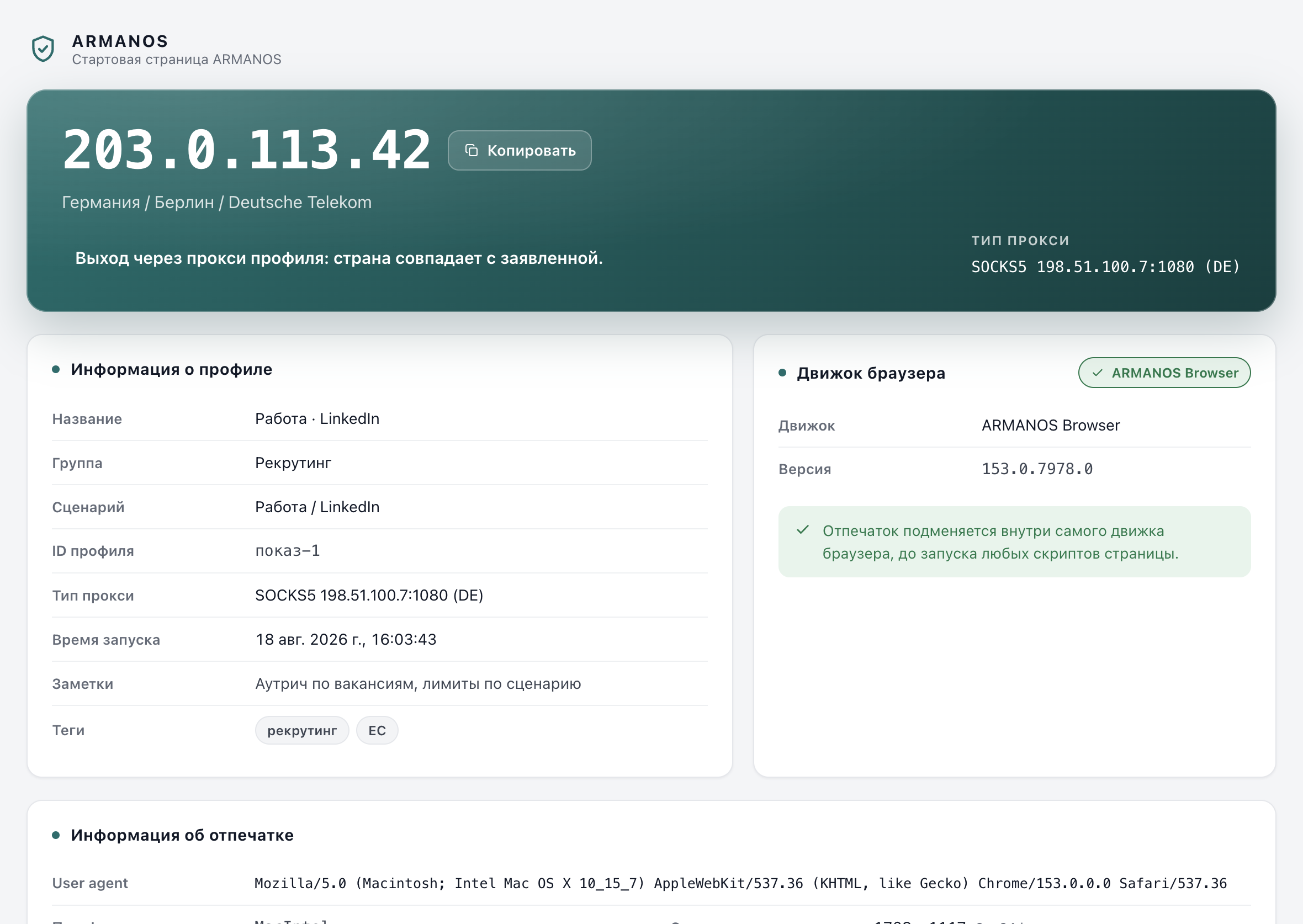
The page shows the exit IP with country, city and network, a card for the profile, a card for the engine that is actually running, and a card with the readings the profile presents. The one outbound request it makes is the IP lookup, and that request travels through the profile's own proxy. That is the entire point: you see the address a site would see, not the address your computer has.

Two rows of links sit under the cards. Five well-known fingerprint checkers open in a new tab, so you can confirm the profile against something that is not ours. The shortcuts row is the same set that is seeded into a new profile's bookmarks bar, so the page and the bar can never disagree with each other.

Each launch gets a random token in the address, the server binds to 127.0.0.1 only, and a content security policy limits which hosts the page is allowed to reach rather than trusting its own script. In a headless run the start page is skipped entirely: measured on the shipped build, Chromium refuses multiple targets in headless mode and exits with code 13, and a page built to be looked at has no reader there anyway.

The ARMANOS start page inside a profile: exit IP with country and network, a profile card, an engine card and the fingerprint readings.
The first tab of every profile that has a window. Served from 127.0.0.1 inside the app, so no launch is announced to anyone.

The scenario sets the pace, and the first week is slower

A profile takes a scenario when it is created: privacy, e-commerce, social, ads or freelance. Between them they name 20 platforms. The scenario is not a label. It selects which scripts are injected, which tracker lists apply, whether tracking parameters are stripped from links, and what the daily ceilings are.

The ceilings are not one number per scenario either. Social carries ten of them, because platforms count separate things separately: 15 connection requests a day, 120 likes, 30 comments, 25 direct messages, 15 posts, 2 account switches. Ads keeps payment edits at one a day, which is exactly the action an advertising platform watches hardest. Privacy has no ceilings by design, because it is not an account game.

New accounts get a ramp rather than the full number. A profile counts its age from creation, and for the first seven days the ceiling is a fraction of the full one: 20, 35, 50, 65, 80, 90 and then 100 per cent. What gets counted is a top-level navigation in a profile window, reported by the window itself, and the counters reset with the calendar day.

All of it is guidance, shown as an amber or red hint next to the profile. Nothing is blocked, ever. A tool that stops you in the middle of your own work gets switched off within a week, and then it protects nobody. The numbers live in packages/shared/src/index.js, so the app, the site and this page cannot quote different ones.

ScenarioPlatforms it namesDaily ceiling at full pace
E-commerceAmazon, eBay, Etsy, Walmart, Shopify, WooCommerce, BigCommerce120
SocialLinkedIn, Facebook, Instagram, X, TikTok, Pinterest200
AdsGoogle Ads, Meta Ads, TikTok Ads, Microsoft Ads40
FreelanceUpwork, Fiverr, Freelancer40
PrivacyNone: ordinary browsing without trackingNo ceiling

Fifty accounts arrive as a spreadsheet, not as fifty forms

Your accounts already live in a file somewhere, and its column names are yours, not ours. So columns are matched by meaning: Name, Название and profile name all mean the same column, across the languages this audience actually writes in. What cannot be matched is reported rather than guessed, because a column silently mapped to the wrong field makes profiles that look right and behave wrong, which is worse than an import that refuses to start. Proxies come either as one column in the seller's notation or as separate columns.

Two-factor codes come with the accounts. A profile can hold a TOTP secret, and the app produces the six-digit code itself: RFC 6238, a 30 second step, SHA1 by default with SHA256 and SHA512 accepted, and an otpauth:// address accepted whole because that is what a QR export gives you. Twenty accounts means twenty authenticator entries, and reaching for a phone on every login is the slowest part of the day.

Groups are local, with a name, a colour and an order, up to 200 of them. A selection can be moved into a group, dealt proxies round robin from a pool, or launched together. Deleting is a soft delete: the profile leaves the list, stops counting against the quota and can be restored from the recycle bin. Purging it is a separate, final act.

The launch queue is where the memory of your machine enters the story. The limit on simultaneous browsers is computed rather than hardcoded, because a hardcoded twelve was wrong in both directions: eight gigabytes will not hold twelve browsers, and sixty four would hold three times more. Below the limit everything opens at once. Above it, the rest wait for a seat instead of being marked failed, and that distinction is the difference between a nightly warm-up that finished and a red run in the morning.

8 GB machine
5 browsers at once
16 GB machine
13
32 GB machine
29
64 GB machine
32, the ceiling

Total memory minus 3 GB for the system and the app, then 1 GB per browser, held between 4 and 32. The Engine screen accepts your own number instead, because the calculation protects someone who configured nothing, it does not argue with someone who knows their hardware.

The ARMANOS profile list: each row shows the profile name, its scenario, its proxy, its group and whether it is running.
The profile list. A selection here is what bulk actions, flow runs and schedules operate on.

Work that repeats gets handed to the app

The automation builder takes 16 kinds of step and no code. Three of them hold other steps: repeat, condition and for-each, nested up to four levels deep, with 500 steps per list and 200 flows stored. A run takes a selection of profiles and a number of parallel workers, and that number is capped by the same memory-derived limit, so workers are never created only to stand in a queue from the first second.

Schedules run flows daily, weekly or hourly, in local time, so nine in the morning stays nine after the clocks change. Missed runs are not caught up. A laptop that slept for three days would otherwise wake into three simultaneous runs across thirty profiles, and that burst is exactly what platforms read as a robot. A schedule also lives only while the app is open: no background service is installed, and the window says so rather than hiding it in a help page.

The synchronizer mirrors one profile into many in real time. Clicks, typed values, scrolling, keys and navigation are captured in the master page and replayed in each target. The tab it works on is the one you are looking at, not the first one that happened to open, which is a correction that came out of a live measurement rather than a code review.

For programs there are four doors. The local API listens on 127.0.0.1:50325 with eleven routes behind a token, and refuses any request that carries browser headers, because a web page reaching loopback through a rebound DNS name could otherwise tie every profile on the machine to one installation. An MCP server exposes nine tools over stdio for an assistant, proxying to that same local API. And the Node and Python SDKs wrap the server API with no logic of their own, so they cannot drift away from it.

  • goto

    Open an address in the profile's tab.

  • wait

    Pause for a fixed time, or until a selector appears, with its own timeout.

  • click

    Click the element a selector matches.

  • input

    Put a value into a field and fire the input event the page listens for.

  • scroll

    Scroll by an amount, or to an element.

  • extract

    Read text from an element into a variable for later steps.

  • screenshot

    Capture the page as it stands, kept with the run.

  • key

    Send a single key, for pages that answer Enter or Escape.

  • random

    Pause a random time between a minimum and a maximum.

  • repeat

    Run the steps inside it a set number of times.

  • condition

    Two branches, one taken: selector present or missing, text contains, URL contains, variable equals.

  • foreach

    Run the body once per matched element, up to a cap you set.

  • tab

    Open, switch or close a tab, by index or by address.

  • cookie

    Read, set, delete or clear cookies on the profile's own session.

  • js

    Run JavaScript in the page and optionally keep the result in a variable.

  • waitRequest

    Wait until the page makes a network request matching a pattern.

A team shares a workspace, not a password

A workspace has one owner and three roles: owner, admin and member. Admins and the owner manage people; a member works. Before this existed, teams did the obvious thing and shared one login, which is exactly the arrangement the product promises to replace.

Invitations go to an account that already exists. That is a deliberate restriction with an honest reason: mail cannot yet prove that someone owns an address, so a stranger who learned an invite code would simply register on that address and walk in. Requiring the account first closes that door. Seats are counted when the invitation is written, not only when it is accepted, so a full team refuses the owner rather than refusing the colleague who cannot fix anything.

Folders decide what a member sees. An admin picks which groups are visible to them, and an empty list means everything again, as an explicit lifting of the restriction rather than an accident. Sharing a single profile and setting a member's folders both work from inside the app, not only from the server, because the people who live in the app were the ones who never knew these existed.

Devices and locks are the other half. A machine registers by hardware id against the seats a plan carries, and the server names which row in the list is you, rather than letting the app guess by hostname and unbind a colleague's identically named laptop. A profile open on one machine cannot be opened on another: the second machine gets a plain refusal naming who holds it, and a takeover has to be chosen.

PlanProfilesDevicesTeam seats
Free211
Professional10 to 10021
Business200 to 100053
Enterprise5000 and up2020

Seats and profiles are bought separately

An extra team seat is $3 a month and an extra profile is $2 a month, on top of any plan. Paying by the quarter takes 10 per cent off, paying by the year takes 20 per cent off. Enterprise is priced by agreement, so no number is invented for it.

What this does not do

  • It does not hide your address by itself. Without a proxy, a profile goes out on the same IP as everything else on this computer.
  • It does not behave like a person for you. Typing speed, pauses, what you click and how often are yours, and platforms watch all four.
  • It does not promise that an account will survive. Age, payment method, content and complaints decide too, and none of those are ours to control.
  • The builds are not signed or notarized yet. macOS blocks the first launch until you allow it, and Windows warns about an unsigned installer.
  • Schedules and flows run only while the app is open. Nothing is installed as a background service, so a closed laptop runs nothing.
  • Not every reading is substituted inside the engine yet. Each build ships a manifest of what it closes itself, and the app closes the remainder from the profile extension, which is a weaker place to do it.

How to check

Every claim above has a file that implements it and a stand that fails when it stops being true. These are the paths in the repository.

A sign-in started on the site really lands in the app
apps/desktop/src/lib/handoff.js · apps/desktop/test/передача-входа-из-сайта.js
The same profile presents the same machine on every launch
packages/shared/src/index.js (seededPick, FINGERPRINT_TEMPLATES) · apps/desktop/test/fingerprint-consistency.js · apps/desktop/test/fingerprint-version.js
An authenticated proxy works, and its password never reaches the command line
apps/desktop/src/lib/proxyAuthBridge.js · apps/desktop/test/proxy-auth-bridge.js · apps/desktop/test/мост-принадлежит-профилю.js
Past the limit, a profile waits for a seat instead of being marked failed
apps/desktop/src/lib/engine-config.js · apps/desktop/test/предел-открытых.js · apps/desktop/test/очередь-запуска.js · apps/desktop/test/сценарий-ждёт-места.js
The engine declares only what it actually closes, and the page closes the rest
apps/desktop/src/lib/дыры-страницы.js · apps/desktop/test/опись-умений-снимается.js · apps/desktop/test/страница-отходит-когда-движок-умеет.js
Folders and profile sharing work from the app, not only from the server
apps/server/src/team/team.service.ts · apps/desktop/test/доступ-команде-из-программы.js · apps/web/test/member-folders.js

Install it and open the first profile

Two profiles are free for good, with no card. The engine is inside the installer, so there is nothing else to download.