Esta página aún no está en su idioma. Está leyendo el texto en inglés.
Knowledge base
Block trackers and read the Protection screen
What the screen shows
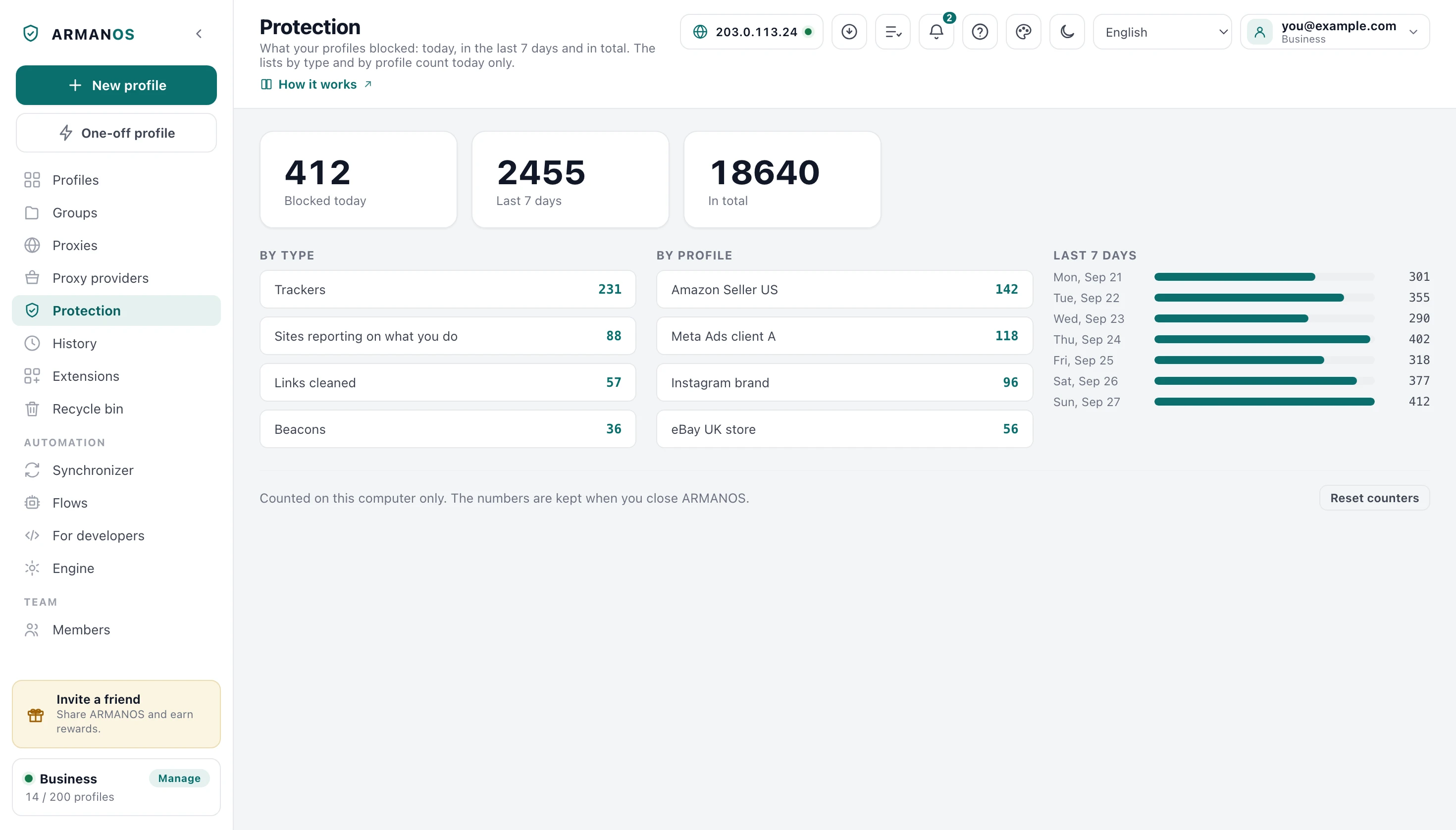
Three cards sit at the top: Blocked today, Last 7 days and In total. Under them are three lists: By type, By profile and Last 7 days, where a day has its date and a bar.
Until something is blocked after the last reset, the cards read zero, and in place of the three lists the screen says “Nothing blocked yet. Launch a profile.”, explains in one sentence what is counted here and offers Go to profiles.
The first blocked request brings the lists back, and the numbers then change by themselves while the screen is open.
Where the numbers come from
A profile checks the address of the requests its pages make against its tracker lists, and a request that matches is cancelled before it leaves the computer. Those cancelled requests go into the counters along with the other types below.
Both engines use the same lists. On ARMANOS Browser the counts arrive in short batches, so a number can trail the page by a moment.
The counts are kept on this computer and stay after you close ARMANOS. Nothing sends them to your account, to a teammate or to your other computer.
What the types mean
Trackers are requests to the addresses on the tracker lists, such as analytics, session recording and ad pixel services. Sites reporting on what you do counts the reports a platform sends to its own site about what you do there, which a list of other sites' addresses does not catch.
Links cleaned counts page addresses that carried tracking tails such as utm tags, fbclid or gclid, cut off before the page loads.
Beacons are reports a page sends by beacon, often as you leave it: the page is told the report went, and nothing goes. WebSocket tracking is the typing and read signals of chats, dropped in Social media profiles.
What a scenario switches on
This screen switches nothing on. A profile blocks from its first page, and its scenario decides which lists and rules it carries.
Privacy, E-commerce and Freelance carry the general list and link cleaning. Social media adds the LinkedIn and social platform lists, the platforms' own reporting rules and the chat signals, and Ad accounts adds the ad pixel list with rules for Google Ads and Facebook.
There is no switch that turns blocking off for a profile. A profile that is open picks up a new scenario at its next launch.
- 1
Open the profile's menu
Right-click its card in the Profiles list.
- 2
Press Edit
The Edit profile window opens.
- 3
Pick another Scenario
The list right under Name.
- 4
Press Save
The button at the bottom of the window.
Today and the days before
By type and By profile hold today's counts and start from zero at midnight by this computer's clock. The Last 7 days card adds up the rows of the Last 7 days list, and In total runs from the last reset.
The list holds exactly seven days of this computer's calendar: the six days before today and today at the bottom. A day when nothing was blocked shows as zero.
By profile puts the busiest profiles first and shows the top of the list. A profile in the Recycle bin shows as Deleted profile, and Delete permanently removes its row.
Reset counters
The button at the bottom right asks first and then clears the counters, the daily history included. The lists and rules inside your profiles stay as they were.
What this does not do
- It does not hide every ad. The lists aim at tracking, and an ad blocker goes into a profile as an extension.
- It does not prove a site learned nothing. It counts what the lists and rules caught, and a tracker missing from them passes without a mark.
- It does not let you edit the lists or switch blocking off. What ARMANOS blocks in a profile follows its scenario.
- It does not add up across computers. The numbers belong to the computer they were counted on.
Where this is decided
The claims that carry the most weight, with the stand that checks each of them.
- On the built-in engine, an extension with blocking rules of its own does not switch off tracker blocking or link cleaning
- apps/desktop/test/расширение-не-снимает-защиту.js
- Both engines decide the same way on the entries of the real tracker lists
- apps/desktop/test/движки-судят-список-одинаково.js
- Social media gets LinkedIn's own rules, and each platform's rules act on its own sites only
- apps/desktop/test/слежка-по-хостам.js
- In a real ARMANOS Browser window a tracker request does not reach the network, and a tracking tag is cut off on navigation
- apps/desktop/test/блокировка-живьём.js
- The day changes at local midnight, Last 7 days is seven calendar days with zeros, and the card equals the sum of the bars
- apps/desktop/test/защита-сутки-и-неделя.js
- Deleting a profile for good removes its protection counters
- apps/desktop/test/delete-leaves-nothing.js
Questions
- Why is everything at zero?
- Nothing is counted until a profile opens pages on this computer. Launch one, visit a site or two and come back.
- Can I turn blocking off for one profile?
- No. What ARMANOS blocks in a profile follows its scenario, which you change in the Edit profile window.
- What does the “Sites reporting on what you do” row count?
- Reports a platform sends to its own site about what you do there. For Social media profiles that covers LinkedIn, Facebook, Instagram, X and Pinterest, and for Ad accounts Google Ads and Facebook.
- Do these numbers reach my other computer?
- No. They are counted and kept here, and nothing sends them to your account.
- Why does a row say Deleted profile?
- That profile sits in the Recycle bin. Press Delete permanently there and the row goes with it.
- Does blocking work on both engines?
- Yes. Both read the same lists and report into the same counters.
See it on one profile
The free plan gives two profiles, with no time limit and no card.