Diese Seite gibt es noch nicht in Ihrer Sprache. Sie lesen den englischen Text.
Comparisons
ARMANOS and a regular browser
Comparison by point
Eleven points where accounts in a regular browser stay shared.
| Regular browser | ARMANOS | |
|---|---|---|
| Cookies and sign-ins | Shared across the browser | Its own in every profile |
| Device | One for all tabs | Its own in every profile |
| Exit address | One per browser | A proxy per profile |
| Time zone and language | Set by the machine | Follow the exit country |
| Many accounts at once | One identity for all windows | Dozens of profiles side by side |
| Teamwork | Shared passwords | Roles and groups, no passwords handed over |
| Automation | Extensions and scripts by hand | Scenarios, schedule, local API and an MCP server |
| Bulk work | One account at a time, by hand | 23 actions on a selection in one click |
| A new account | An empty browser, warmed up by hand | The Cookie robot walks the profile through ordinary sites |
| Tracking requests | Reach the page unless an extension stops them | Rejected for every profile |
| Two-factor codes | A phone or an authenticator app | The code appears in the profile window |
Device
Regular browser
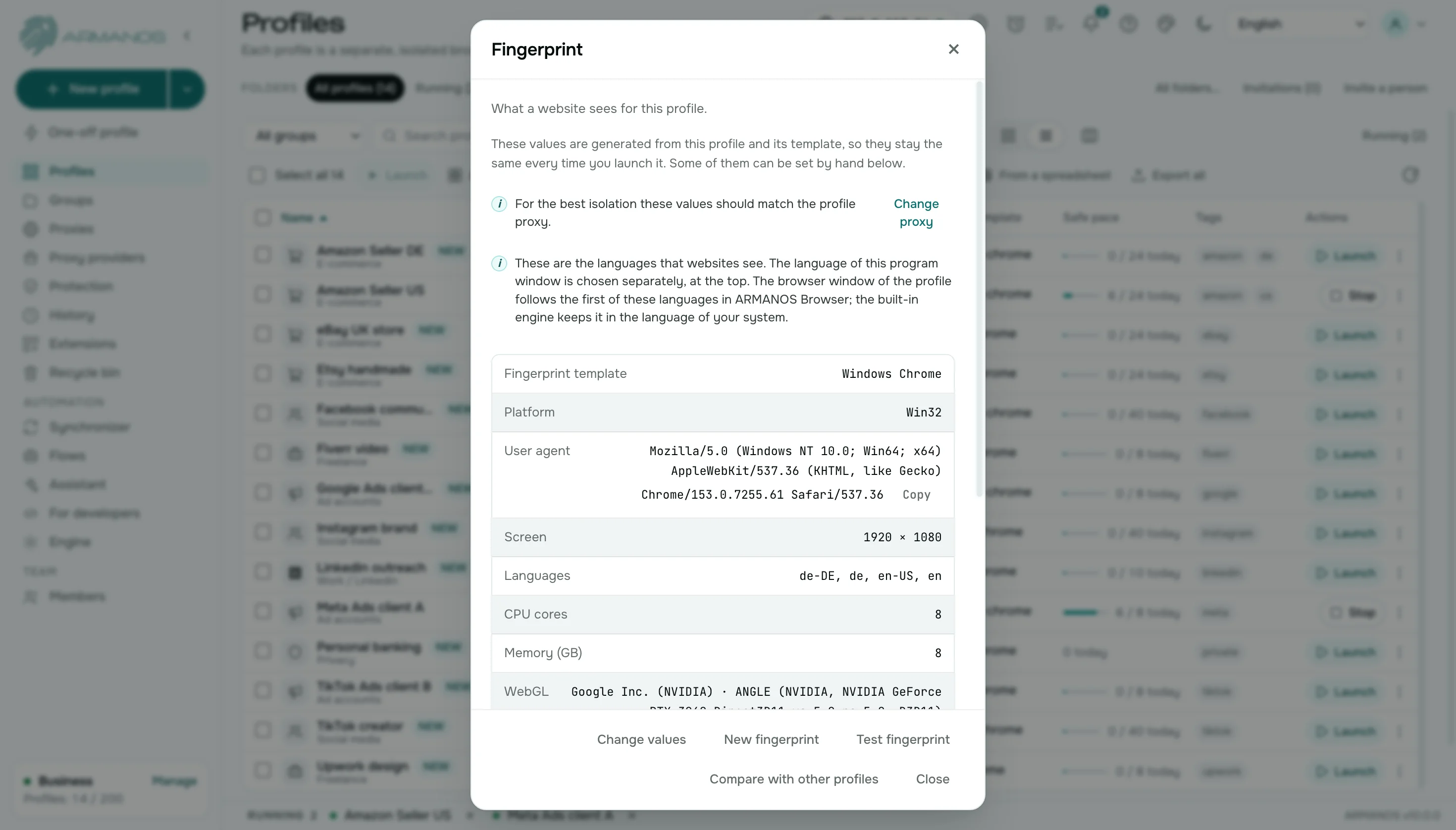
Every tab shows the same device: your computer.
ARMANOS
A profile describes a whole device: platform, screen, graphics card and language. The values come from the profile number and stay the same between launches. Five templates cover macOS, Windows, Linux, an Android phone and a tablet.
Exit address
Regular browser
One address for the whole browser, the one the system sets.
ARMANOS
Each profile has its own proxy. ARMANOS finds the exit country through the proxy itself, and the clock and language follow it.
Team and automation
Regular browser
A colleague gets passwords, and routine runs on extensions and scripts by hand. A shared password does not show who did what.
ARMANOS
A colleague signs in with a role, and passwords stay with you. Routine runs as scenarios, on a schedule, through the local API and an MCP server. The activity log shows who did what.
Extensions
Regular browser
Extensions are shared across the whole browser.
ARMANOS
Pick extensions per profile from a catalog of 11, or install your own from a store link with a check.
Time zone and language
Regular browser
They follow your computer, so a foreign address and a local clock disagree. Sites compare the clock with the address.
ARMANOS
They follow the exit country of the proxy, so the clock and the address agree. The Connection check window shows any gap between clock and address in one row.
Signing in tomorrow
Regular browser
Sessions of different accounts overwrite each other or sign you out.
ARMANOS
Each profile remembers its session. Open it tomorrow and you are signed in where you left off.
Many accounts in one action
Regular browser
To change something for twenty accounts you open twenty windows one by one.
ARMANOS
Select profiles and apply an action to all of them: launch, group, status, tags, proxy, extensions, password. Select all takes everything your search and filters found, and every run shows its progress in the Task centre.
A new account
Regular browser
A new account opens in an empty browser with no history behind it.
ARMANOS
The Cookie robot visits ordinary sites inside the profile: search, news, shopping, reference, video and forums. Pick 3 to 30 sites and 10 to 90 seconds on each, and the account opens in a browser that looks used.
Trackers and tracking links
Regular browser
Tracking requests and tracking parameters in addresses reach the page unless you add a blocker.
ARMANOS
Every profile rejects requests to tracking hosts at the network layer and strips 40 tracking parameters from the addresses you open. The Protection screen counts what was blocked.
What you get
Profiles that stay apart
Its own directory, cookies, extensions, proxy and fingerprint in every profile.
A whole device
A profile describes a full computer, not a User agent line.
Its own way to the network
Every profile reaches the internet from its own address.
A team without shared passwords
Separate sign-ins, roles, profile groups and an activity log.
When to choose ARMANOS
You have more than one account
Each needs its own cookies, its own device and its own address.
A team works on the accounts
Roles, groups and shared access with no passwords handed over.
You want to automate routine work
No-code scenarios, a schedule, a local API and an MCP server.
Questions and answers
- Do I have to give up my regular browser?
- No. ARMANOS opens accounts in its own profiles, and you keep using your usual browser as before.
- Can I move accounts out of a regular browser?
- Yes. Export cookies and Import cookies move a profile's cookies as one file, and From a spreadsheet builds profiles from your table.
- How do I open a second account on the same site?
- Create a second profile: it has its own cookies, its own device and its own address. Both windows run side by side.
- How many profiles can I create?
- The free plan gives you two profiles with no time limit and no card. After that the number of profiles depends on the plan.
- Do I need a proxy for every profile?
- A profile can go online on its own address. For accounts that need an address of their own, give each profile a proxy from the library, or your own server over SSH.
- Can two colleagues work in one profile?
- Not at the same moment: a profile is open in one place, and the next person sees who holds it. Working in turns goes through a role, with no password handed over.