هذه الصفحة غير متوفرة بلغتك بعد. أنت تقرأ النص الإنجليزي.
Profile password
A password on a single profile
- Opening, editing, export, delete, copy, sharing
- Asked before
- Closed for an hour, for that person only
- Wrong three times in a row
- A scrambled copy, not the password
- Kept on our server
- Not encrypted
- Files on disk
What the password closes
The password is asked before this profile is opened, edited, exported, sent to the sync folder, deleted, copied or shared, and before its saved sign-in or 2FA key is shown. A copy keeps the same password. It holds in the app, in the dashboard and in scripts, on every machine of your team.
The password closes actions in ARMANOS. It does not encrypt the profile on disk.
A mark by the name
A closed profile wears a padlock mark in the list. Once the password is entered, the mark says until when the profile stays open, and Lock now sits next to it.
Open for ten minutes
Each action inside those minutes extends them, so an edit window opened after the password saves without asking again.
Until ARMANOS closes
A tick in the password window keeps the profile open until you quit the app. Locking the screen, sleep and signing out close it again.
Bulk actions
A bulk launch asks for each closed profile in turn, with Skip this one. Other bulk actions leave closed profiles alone and name them in one line.
Setting it
Open the three dots on a profile and choose Password. To give several profiles one password, select them and press Password in the bar of bulk actions.
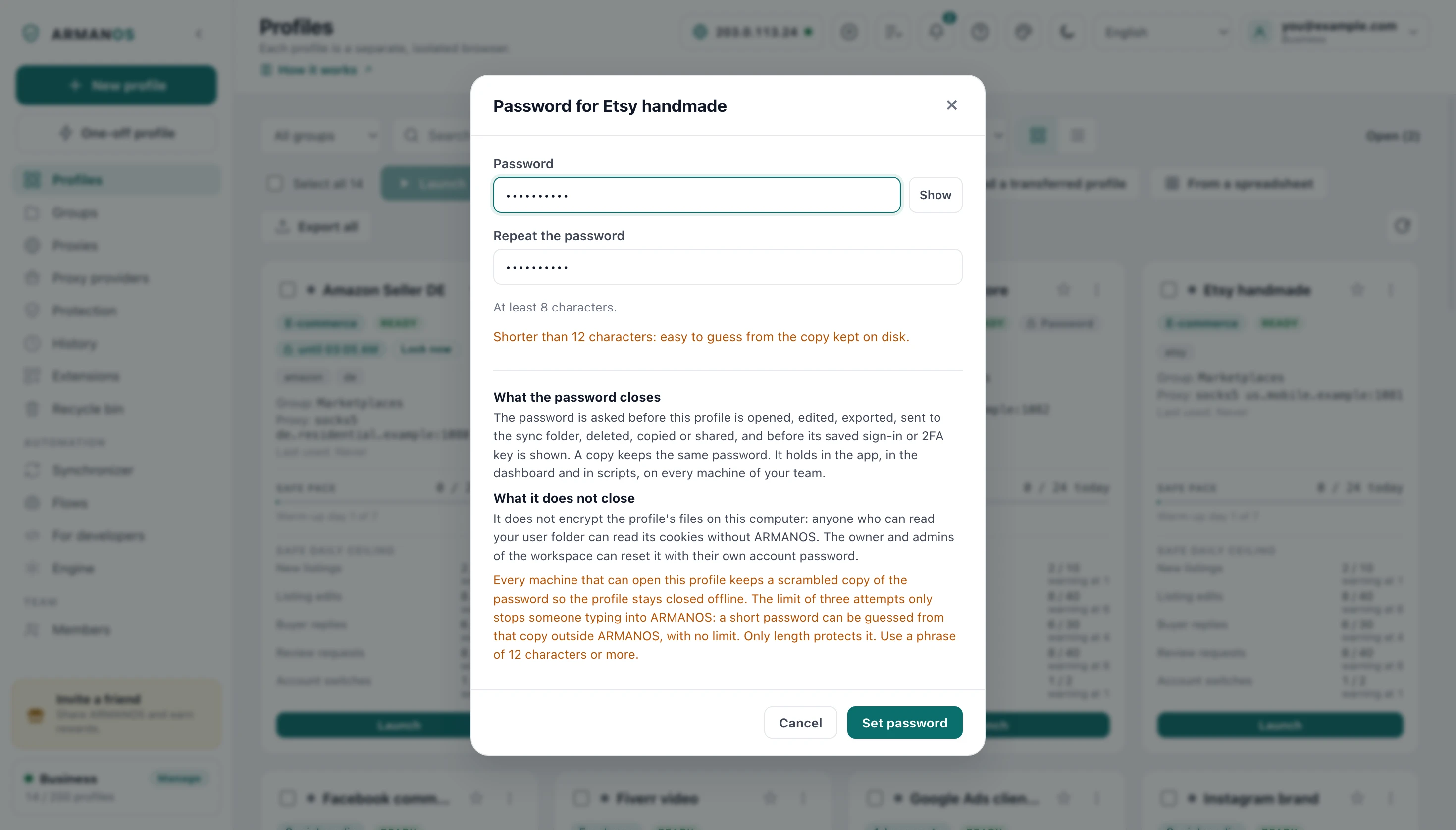
A password is set only while you are signed in to your account, because without an account a forgotten one could not be reset. It needs at least 8 characters. Under 12 the window warns you, and the reason is below.
- 1
Three dots, Password
In the profile list, on the profile you want to close.
- 2
Type it twice
The window warns when the two differ and when the password is short.
- 3
Set password
The profile stays open for you now, and the lock mark appears in the list.
Wrong passwords
Three wrong passwords in a row close the profile for an hour, but only for the person who typed them: a teammate cannot lock the owner out of the owner's own profile. On top of that, ten wrong passwords in an hour across all profiles close password entry for that person for an hour.
Correct passwords are not limited, so a bulk launch of closed profiles does not run into a wall.
Forgotten password
The owner and admins of your workspace can reset it, and the reset is logged.
They confirm it is them with their own account password, and with the authenticator code if two-step sign-in is on. An admin cannot reset a password the owner set, and whoever set the password gets a notice in the app: whose profile, who reset it and when.
Scripts, schedules and the AI assistant
The local API takes the password in the body of the request, never in the address: a request with a password in its address is refused before any check and costs no attempt. A request from a web page is refused before the password is looked at, so a site you visit cannot burn your attempts.
A flow or a schedule skips a closed profile and says Protected by a password, not a failure. Open the profile with Don't ask again until ARMANOS closes ticked, and the night run takes it, provided the computer stays awake with the screen not locked.
The AI assistant can pass the password to launch_profile, and its description warns that your AI provider sees it. Opening the profile in ARMANOS first is the better road.
- POST /api/v1/browser/start
- {"profileId": "…", "password": "…"}
- POST /api/v1/profile/unlock
- {"profileId": "…", "password": "…", "keepUntilExit": true}
- POST /api/v1/profile/lock
- {"profileId": "…"}
- …/browser/start?password=…
- Refused: password_in_query, no attempt spent
Answers name the reason with a code, with attemptsLeft or until beside it.
In the Dashboard
A closed profile wears the same mark on the site. Editing, deleting, sharing, extensions, a copy and wiping it from the bin ask for the password. The pass lives in the memory of the tab for 15 minutes, and Sign out closes it on the server.
What this does not do
- It does not encrypt the profile's files on this computer: anyone who can read your user folder can read its cookies without ARMANOS. The owner and admins of the workspace can reset it with their own account password.
- Every machine that can open this profile keeps a scrambled copy of the password so the profile stays closed offline. The limit of three attempts only stops someone typing into ARMANOS: a short password can be guessed from that copy outside ARMANOS, with no limit. Only length protects it. Use a phrase of 12 characters or more.
- A running profile is open: its window and debug address answer without the password until you stop it.
- There is no Remember password. The password is kept nowhere, neither in a file nor in the system keychain, so a forgotten one can be reset but not shown.
- It is not a password on the app itself: anyone signed in to your computer can open ARMANOS.
How to check
Each claim above sits in one file.
- Every door to the profile asks for the password, on both engines
- apps/desktop/src/main/main.js · apps/desktop/test/пароль-профиля-двери.js · apps/desktop/test/пароль-профиля-запуск.js
- The windows: mark, Lock now, one by one in a bulk launch, the local API
- apps/desktop/src/manager/profile-password.js · apps/desktop/test/пароль-профиля-окна.js
- Three wrong in a row per person, ten per hour across profiles, correct ones not limited, reset with the account password
- apps/server/src/profiles/profile-protection.service.ts · apps/server/test/пароль-профиля-промахи-и-сброс.js
- The pass has its own key, lives 15 minutes and dies at sign out
- apps/server/src/profiles/profile-unlock.service.ts · apps/server/test/пароль-профиля-пропуск.js
- A copy keeps the password
- apps/server/test/пароль-профиля-копия.js
- Whoever set the password learns who reset it
- apps/server/test/пароль-профиля-кто-сбросил.js
- The password is not written to any file, log or answer
- apps/desktop/test/пароль-профиля-не-утекает.js
- The same launch arguments and fingerprint with and without the password
- apps/desktop/test/пароль-профиля-запуск.js
- The Dashboard keeps the pass in the memory of the tab
- apps/web/lib/пропуск-профиля.ts · apps/web/test/пароль-профиля-кабинет.js
Questions
- Does a teammate need the password?
- Yes, to open, edit or share a profile that has one, on their machine, in the Dashboard and in scripts.
- Who can set it?
- The person who created the profile, an admin or the owner of the workspace. A member to whom the profile is only opened cannot set or remove it, so they cannot lock the owner out.
- What happens to a copy?
- The copy gets the same password on the server in the same step that creates it, so there is no open twin. It is made only while ARMANOS is connected to your account.
- Does an exported archive carry the password?
- No. The export asks for the profile password first, and the archive is then closed by the archive password you type: whoever knows the profile password decides to let the session out.
- Do sites see anything new?
- No. The password is asked in ARMANOS before the browser starts, and nothing about it reaches the browser: the fingerprint stays the same.
- Is it on the free plan?
- Yes, on all plans.
Close the profiles that matter
Install ARMANOS, sign in, and put a password on a profile from its three dots.