هذه الصفحة غير متوفرة بلغتك بعد. أنت تقرأ النص الإنجليزي.
Import
Import accounts from a spreadsheet
- 25
- Columns understood
- .csv .txt .tsv .xlsx
- File shapes
- 200
- Profiles per batch
- 100
- Saved templates
Your list already exists
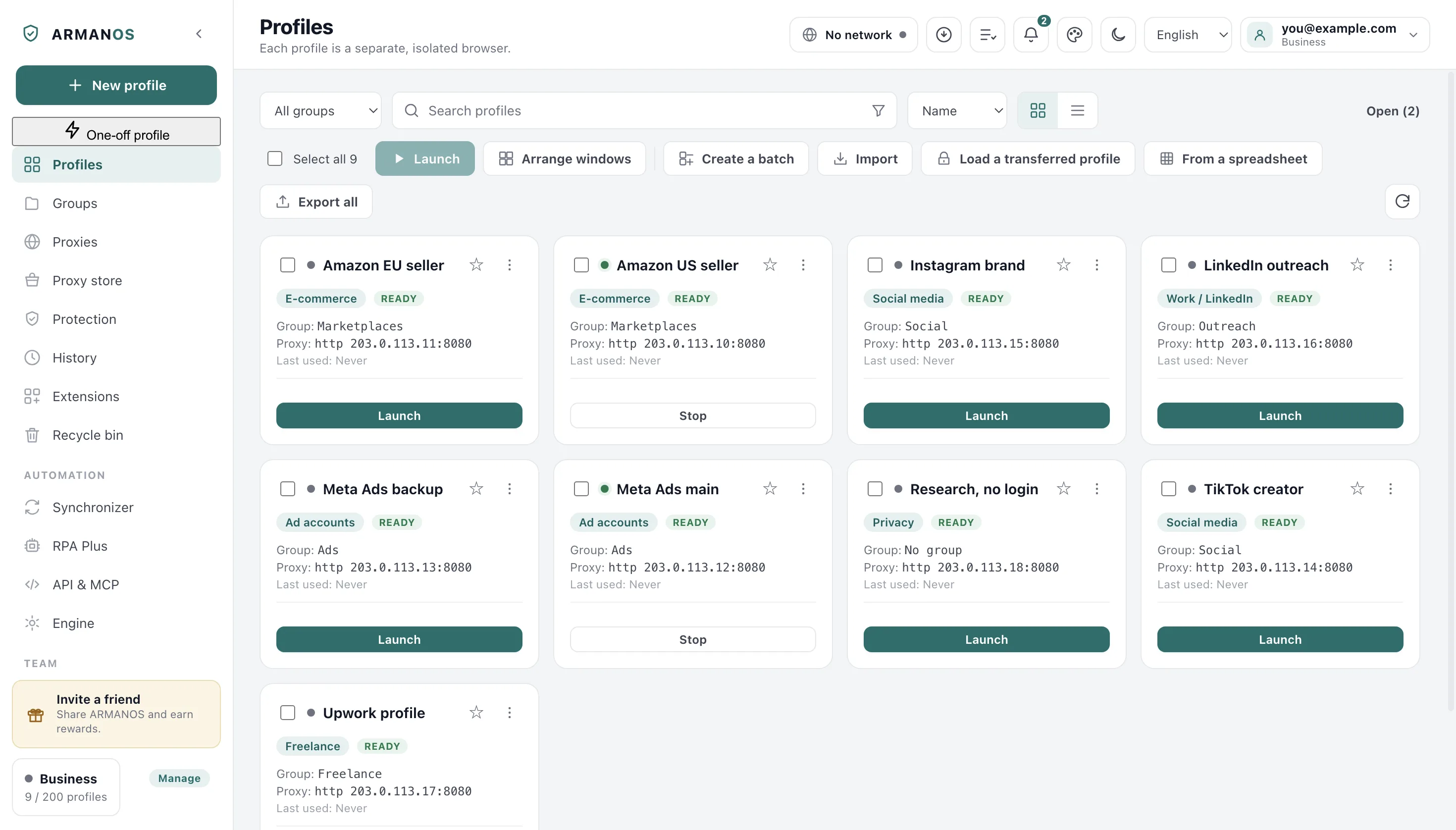
Setting up fifty accounts one at a time is the most tedious thing this app can ask of you. Press From a spreadsheet above the profile list and hand it the file you keep.
The picker takes csv, txt, tsv and an Excel .xlsx workbook, which is what most spreadsheet exports produce. A text file is read by CSV rules rather than split on commas, because a reader one column off says nothing about it.
Rows can also be pasted without a file: the Paste text tab reads a piece of an Excel or Google Sheets sheet. A row with a profile ID updates that profile instead of making a second one, and the preview shows in advance which rows create profiles and which update them.
| What arrives in the file | What the reader does with it |
|---|---|
| A byte order mark from Excel | Stripped, so the first header still matches. |
| Semicolons or tabs instead of commas | Counted on the header line outside quotes, so comma, semicolon and tab all work. |
| A quoted field with commas or line breaks | Kept whole: a name like "Ivanov, Ivan" stays one cell and does not shift the row. |
| A doubled quote inside a field | Read as one literal quote, the way RFC 4180 defines it. |
| Windows line endings, a trailing blank line | A row empty in every cell is dropped instead of becoming a blank profile. |
Columns matched by meaning
Your column names are yours, not ours. Case, spaces and underscores make no difference, so Profile Name, profile_name and PROFILE NAME are the same thing.
You need not rename your headers, and not only English ones: Russian, Spanish, German, Polish, Turkish, Japanese and Chinese work too. A column that matches nothing is not guessed at: you see it by name among the columns not used, and you pick its field yourself in This column above the preview.
| Field | Headers that match it | What it becomes |
|---|---|---|
| Name | Name, Profile name, Account, Имя | The profile name. The only required cell. |
| Group | Group, Folder, Team, Группа | A real group, created if it is missing. |
| Proxy | Proxy, Proxy URL, Прокси, 代理 | One cell in the seller's own notation. |
| Proxy type | Proxy type, Protocol, Тип, Протокол | http, https, socks5 or ssh. |
| host | Proxy host, Host, IP, Хост | The address the profile goes out through. |
| port | Proxy port, Port, Порт | A port between 1 and 65535. |
| username (if needed) | Proxy login, Proxy username, Логин прокси | Only headers that say proxy. |
| password | Proxy password, Proxy pwd, Пароль прокси | Only headers that say proxy. |
| Fingerprint template | Template, Fingerprint, OS, Шаблон | One of the five fingerprint templates. |
| Scenario | Scenario, Purpose, Сценарий | Rows without one get Privacy. |
| Tags | Tags, Labels, Теги, Метки | Split on commas and semicolons. |
| Notes | Notes, Comment, Заметки | Carried across as written. |
| One-time code | 2FA, TOTP, OTP secret, Ключ 2FA | The one-time code key for that account. |
| Profile cookies | Cookie, Cookies | Cookies in JSON or Netscape. On the built-in engine they go into the new profile; on ARMANOS Browser they do not, and the window says so before anything is created. |
A password column means account
An accounts spreadsheet almost always has a Login column and a Password column next to each other. They belong to the account rather than the proxy, and they never reach the proxy fields.
Only a column whose header says proxy goes into the proxy login and the proxy password. You see a bare Login or Password column among the columns not used, and it travels nowhere.
Why the proxy aliases are narrow
What one row becomes
Each row becomes a profile draft, field by field, and the draft is what you approve in the next step.
Your file can carry the proxy in one cell in the seller's own notation, or as separate columns. The type is never guessed: an empty cell reads as http, and a type the app does not support is named out loud rather than quietly downgraded.
- 1
Name
Comes across as it is, and an empty cell makes the row a problem rather than an unnamed profile.
- 2
Proxy
Arrives in the single proxy column, or in the type, host, port, user and password columns.
- 3
Template
The word in the cell resolves to one of the five templates: windows, ubuntu, phone and tablet land where you expect.
- 4
Group, tags, notes
Tags are split on commas and semicolons inside the cell, and notes come across as written.
- 5
One-time code key
A bare secret or a whole otpauth:// link, which carries its own digits, period and algorithm.
- 6
Scenario
Taken from the cell when there is one, and rows without it get Privacy.
Nothing is created unseen
The import runs in two steps on purpose: first you see what became of your file, and only then does the first profile exist.
You see both sides: each column shows your header on top and the This column choice with our field under it. Below sit the first five rows as values, so a mapping one column off shows up in the values themselves.
- File
- accounts.csv · rows found: 120
- This column
- Аккаунт: Name · Логин прокси: username (if needed) · Тип: Proxy type
- Columns not used: 2
- Purchase date, Manager
- Sample row
- line 2 · Amazon Seller DE · Marketplaces · socks5://198.51.100.10:8000
- Rows that could not be read fully
- 3. Lines: 14, 27, 88
Line numbers are the ones in your spreadsheet: the header is line 1, so the first account is line 2.
A bad row keeps its number
You still see the row with a problem in the list. Hiding it would mean an import that silently drops rows, and you would find out weeks later that account 47 never arrived.
A checkbox decides what happens next. Ticked, which is the default, only clean rows are created; unticked, an unreadable proxy cell gives you the profile without a proxy rather than nothing at all.
| Problem in the row | How it looks | What the import does |
|---|---|---|
| No name | The Name cell is empty | The row is not lost: the profile gets a numbered name in order (such as Profile 1) or one by your template from Name, if the row has none, and the preview shows it before the button. |
| Proxy not readable | "ask the seller" in the Proxy cell | Reported with the line number, and the profile is created without a proxy rather than an invented one. |
| Proxy type unsupported | A protocol the app does not speak | Reported. Nothing is quietly downgraded to http. |
| 2FA key unusable | A secret with characters that are not base32 | Reported, never stored. Wrong codes fail the login, and a few failures lock the account out. |
Groups come from the file
Group names in the file become real groups in the app. Case makes no difference, so Sales and sales do not become two groups, and a missing group is made for you.
When you are signed in the group is created in your account too, so an imported profile lands in the group your colleagues see.
From a template to a batch
Open a profile, set it up the way you need it, and press Save as a template. The template is those decisions under a name, and it does not carry the fingerprint.
The Templates window (the arrow next to New profile, Manage templates…) lists them all: Edit opens the profile window as a template, then Duplicate, Use for new profiles and Delete. The default template fills the New profile window, comes first among the templates of a quick profile and is picked in a batch and in an import.
That second half matters more. Every profile has a fingerprint of its own, so fifty profiles from one template are fifty different machines, while fifty copies of one machine show as a group at once.
Stored in a template
Scenario, fingerprint template, group, proxy, rotation, opening address, headless, browser kernel, notes, tags, status, extensions, profile password. Proxies go one for every profile, a free one from the list for each, or a random one from the list.
Never stored
The fingerprint, the cookies, the sessions. Each new profile is its own machine, unlike its neighbour.
Limits
Up to 100 templates, a name up to 60 characters, up to 12 tags per template.
Fifty profiles in one go
Press Create a batch, pick a template or a system, type a base name and a count. Names continue the series and the numbers are all one width, so Work 01 to Work 50 sorts in order.
The proxies of the batch are chosen in plain view: No proxy, From the template, Each its own, from lines, or Each its own, free ones from the library. The window names a shortage of proxies before creating, and in the table of future profiles you can change the name and the proxy of any row before you press.
- 1
Pick a template or a system
With no templates, No template: pick a system stands first, and Create does not go grey. For a template, the line under the picker names the scenario, the group, the proxy and the browser kernel it will use.
- 2
Name and count
A base name, and how many profiles you want from it.
- 3
Read the preview line
You see the first and the last name before you press anything, and fifty wrong names can only be renamed one at a time.
- 4
Create
Profiles appear in the list, each with its own fingerprint and its own storage.
What this does not do
- An old Excel .xls workbook, a password-protected workbook and an OpenDocument file are not read. Save the sheet as .xlsx or .csv.
- A spreadsheet brings settings and the cookies in its column, not a whole session: site storage is not in it. Cookies from the column go into new profiles on the built-in engine but not on ARMANOS Browser: the window says so before anything is created, and you bring such cookies in later with Import cookies in the menu of the running profile. Sign-in cookies can also come in cookie files, the section above.
- A proxy that parses is not a proxy that works. The import reads the address, it does not dial it. Check the entries afterwards in the Proxies view.
- Rows are not matched against profiles you already have. The same name twice gives two profiles, and re-importing the same file creates everything again.
- A bare 2FA secret is read with the standard settings: 6 digits, a 30 second step, SHA1. If your provider issues 8 digits or a 60 second step, put the whole otpauth:// link in the cell.
How to check
Every claim on this page is one file you can open, and most of them have a stand that fails when the behaviour changes.
- The file is read as CSV, not split on commas: BOM, semicolons, tabs, quoted commas and line breaks inside a field.
- apps/desktop/src/lib/csv.js · apps/desktop/test/csv-import.js
- Columns are matched by meaning, and a column that matches nothing is named rather than guessed at.
- apps/desktop/src/lib/profileImport.js · apps/desktop/test/csv-import.js
- An account Login or Password column never becomes the proxy's login or password.
- apps/desktop/src/lib/profileImport.js · apps/desktop/test/csv-proxy-columns.js
- A group name from the file becomes a real group, and a signed-in account gets the server id instead of the local one.
- apps/desktop/src/main/main.js · apps/desktop/test/csv-import-groups.js
- A template copies decisions but not the fingerprint, the quota is checked before creation, and batch names continue the series.
- apps/desktop/src/lib/presets.js · apps/desktop/test/заготовки-и-пакет.js
- The Templates window and the default template on every way of making profiles; a free proxy from the template list for each, a random one, and a refusal before creating when none is free; status and extensions in each new profile.
- apps/desktop/src/lib/presets.js · apps/desktop/test/заготовки-окно.js
- The profile password from a template is set on the server in the same step that makes the profile.
- apps/desktop/src/main/main.js · apps/desktop/test/заготовка-пароль-статус-живьём.js
- No proxy from the list goes to two profiles, at once or one after another: local API requests at once, two batches at once, a quick profile, the New profile window and an import. If the proxy the window showed was taken in the meantime, the profile gets the next free one, and the window says so.
- apps/desktop/src/main/main.js · apps/desktop/test/заготовка-раздача-разом-живьём.js
- A batch without a template: a system to pick, proxies from lines and free ones from the library with no repeats, the shortage named before creating, row edits in the table reach the profile.
- apps/desktop/src/lib/свободные-прокси.js · apps/desktop/test/пакет-без-заготовки-окно.js
- Pasted text and a row with a profile ID: only the non-empty fields change, and the ID from the table does not go into a new profile.
- apps/desktop/src/main/main.js · apps/desktop/test/ввоз-вставкой-и-обновление.js
- A batch from cookie files: a profile per file, cookies in the jar before the first page, a stop at the plan limit in words.
- apps/desktop/src/lib/профили-из-куки.js · apps/desktop/test/куки-из-файлов-живьём.js
Questions
- Where do imported proxy passwords end up?
- In the shared proxy library, deduplicated by host, port and user. The system seals them on Windows only: on macOS the key ships inside the program, and on Linux they are written as typed. A proxy typed in by hand travels whole into a template as well, including the key file path for an SSH exit.
- What if two columns mean the same field?
- The first one wins, because the later one is usually the emptier of the two. The second column is named in the Columns not used line, so you know it was dropped. If you set one field on two columns yourself, the window says so and creates nothing until one is left.
- How many profiles does a batch create?
- Up to 200, with a template or without one. The first failure stops the batch, because if the quota ran out or the network went away, the next forty-nine attempts would fail the same way while you waited for all of them.
- Is my plan checked before profiles are created?
- Yes, before the first profile is created rather than in the middle of the run, both for a batch and for an import from a table. Free carries 2 profiles, Professional 10 to 100, Business 200 to 1000 and Enterprise 5000 and up, and the message says how many fit.
- Does Cancel really drop the file?
- Yes. The app drops the parsed file at its own end, so a later press of Create profiles cannot act on a file you thought you had dismissed.
Bring your list in
In ARMANOS, press From a spreadsheet above the profile list, and check the mapping before anything is created.