Cette page n’existe pas encore dans votre langue. Vous lisez le texte anglais.
Knowledge base
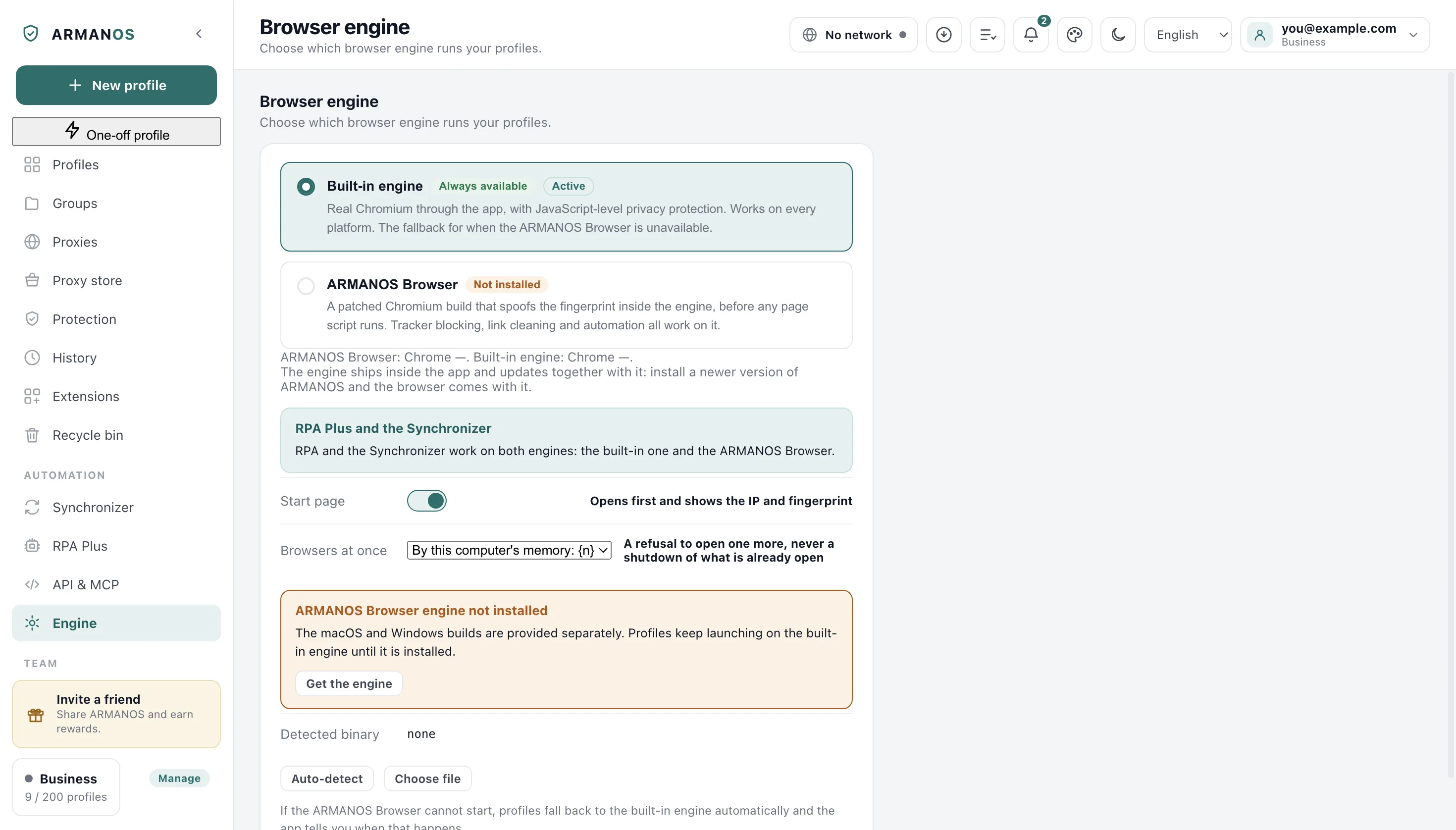
Could not find the ARMANOS Browser engine automatically
What the app was looking for
Auto-detect wants a file it can actually execute, not a folder with the right name. A folder that exists and holds nothing runnable counts as nothing found.
On a Mac the program inside the bundle is used, so a renamed bundle is accepted just as readily.
Where the engine comes from
Every installer carries the engine for its own platform, so a fresh install already has one on disk. This line appears when the copy is missing, moved or unreadable, and the Engine screen carries a button that opens the download page.
Nothing waits on that. Profiles launch on the built-in engine until the file is back in place.
This is a downgrade and not a stop
Where auto detect looks
Three kinds of place: a folder the app manages inside its own data, the copy that came with the installer, and the usual system location for your platform.
On a Mac that is the Applications folder, on Windows Program Files or your local app data, on Linux the opt directory. An engine unpacked to Downloads is in none of them.
Point at the file yourself
Choose file on the Engine screen saves a path only after it runs the file and reads a browser version out of it. A file that cannot run is turned down on the spot.
Reset to auto throws the saved path away and puts the search back.
A profile pinned to a version
A profile can be pinned to its own engine version, and that choice wins over the general setting. A site can read the browser version, so a silent jump for every profile on one day is what we avoid.
If the pinned version is not on this machine, the profile opens on the version that is here, and a message names the version it asked for.
Collecting the evidence
Press Auto-detect once more so the failure is fresh, then open Notifications: the last lines are the ones worth sending.
Write through Help → Write to support. A report about this copy travels with the message: version, system, chosen engine and whether ARMANOS Browser is installed, with passwords and keys cut out first.
What this article does not cover
- A profile that opens and then closes. The engine was found there and it crashed.
- Blocking rules that quietly do nothing. That is the built-in engine working as documented, not a missing file.
- Installing ARMANOS itself. This article starts after the app is already running.
Where this is decided
Each claim above is one place in the code and one stand.
- Several engine versions live side by side and a pinned profile gets its own
- apps/desktop/test/kernels.js
- The build and the app call the engine file by the same name
- apps/desktop/test/сборка-и-программа-зовут-движок-одинаково.js
- Nothing hunts for the engine at a path written into the source
- apps/desktop/test/путь-движка-везде-общий.js
- An installer built without the engine inside is stopped before it ships
- apps/desktop/test/установщик-без-движка.js
Questions
- Do my profiles stop working without it?
- No. They open on the built-in engine, and the app tells you which engine each launch used.
- Why not accept any file I pick?
- Because a stored path that cannot run looks like an installed engine and fails at launch instead of at the moment you chose it.
- Can two engine versions live here at once?
- Yes. Each profile can be pinned to one of them, so an update does not move every profile to a new browser version on the same day.