هذه الصفحة غير متوفرة بلغتك بعد. أنت تقرأ النص الإنجليزي.
Feature
Tracker blocking and link cleaning
- 40
- Tracking parameters stripped
- 4
- Tracker lists shipped
- 3
- Rule sets in the profile extension
- This computer only
- Where the counters live
Blocking in the network stack
Every profile does the same two jobs: it refuses requests to tracker hosts, and it cuts tracking parameters out of the addresses you navigate to. How that is carried out depends on which engine the profile runs.
On ARMANOS Browser the app writes a small extension into the profile folder at launch. It works inside the network stack, so a site finds nothing in the page to notice, and your requests do not wait for the app to rule on each one.
The built-in Electron engine has no such road, so the app cancels a matching request in its own process and redirects an address that can be cleaned. The list of tracker hosts is the same on both engines.
A profile that cannot be protected does not open
Four lists by scenario
The general list holds 31 entries and goes to every scenario: analytics, product measurement, crash reporting and session replay. The other three are scenario specific, and your profile takes the general list plus its own.
A Privacy profile ends up with 31 unique entries, a Social media profile with 74, an Ad accounts profile with 56. Your profile loads nothing the scenario did not ask for, and an unknown list name shows up in the log instead of leaving you with a silent blank.
The ads list is the most restrained on purpose. Every host an ad console needs to sign in, load, bill or answer its own API is deliberately absent, because a rule that fires inside the console you are paid to run is a business risk.
| List | Entries | Goes to | What it holds |
|---|---|---|---|
| general | 31 | every scenario | analytics, crash reporting, session replay, mobile attribution |
| 23 | Social media | LinkedIn ad and analytics hosts, the insight tag | |
| social | 33 | Social media | Meta, TikTok, X, Pinterest, Snapchat and Reddit pixels |
| ads | 25 | Ad accounts | conversion and audience endpoints, data brokers |
Rules for first party telemetry
A domain list catches other people's counters. It cannot catch the platform itself, because those calls go to the very site you came to, from its own address.
For that there are separate sets tied to the platform's own paths, and two of them read the query as well: messaging loses only the calls that carry a typing or read marker, search only the calls that carry a tracking one.
Each set only fires on its own hosts
Every set is locked to its own hosts. The LinkedIn set contains bare words like beacon and telemetry, and fired everywhere they would break an unrelated shop for you, so off its own hosts your profile never applies them.
LinkedIn set
The tracking, pixel and profile view paths, firing only on linkedin.com and licdn.com.
Social set
Meta, X and Pinterest logging paths on those platforms' own hosts. Two Meta entries carry the cross app handshake that ties a Facebook account to an Instagram one.
Ad consoles
No bare path rules here at all, only host plus needle pairs, so nothing of yours breaks on the rest of the web.
Forty parameters are stripped
Every scenario gets link cleaning, and both engines strip exactly the same set of names. They cut on the navigation itself rather than in a redirect loop, so your address bar shows the clean address and the parameter never reaches the page.
The click identifiers are the point of it. An ad click id survives every other kind of tidying and carries exactly the correlation you want cut, so the list covers the platforms the Social media and Ad accounts scenarios work with.
- Ad click ids
- fbclid, gclid, msclkid, dclid, ttclid, twclid, wbraid, gbraid, yclid, rdt_cid, ScCid, epik
- Campaign tags
- utm_source, utm_medium, utm_campaign, utm_content, utm_term, mc_cid, mc_eid
- Session and profile ids
- _ga, _gl, igshid, mibextid, li_fat_id
- LinkedIn trail
- trk, trkInfo, lipi, lici, trackingId, refId, midToken, midSig, trkEmail
You get a clean address on a navigation, and what the page loads afterwards is left as it is.
Two things a filter misses
Two kinds of tracking are structurally out of reach for any network rule. A beacon fires on unload and the payload is the tracking itself, and socket frames are opaque to a filter that only reads addresses.
Where the scenario asks for it, your profile replaces both inside the page's own world. The beacon call reports the event and returns true, so the page believes it succeeded, and short socket frames that name typing or read markers never reach the platform, while the rest of the socket carries on.
A replacement that passes for the original
A replacement has to look like the built-in it replaced. Your profile copies the name and the length from the original, because measured against the shipping engine the beacon length is 1 rather than the 2 the specification implies.
Beacons
The stealth scenarios suppress them, and your count keeps them apart from network blocks.
Read receipts and typing
In the message privacy scenarios those frames never reach the platform, and the rest of the socket is left alone.
Nothing names the product
The event name the two halves share is new at every launch, so a site cannot listen in or forge your counts.
Counters stay on your computer
On ARMANOS Browser your counting happens on your own machine: what builds up over 500 milliseconds goes to a loopback address with a random per profile token. It never leaves the machine.
The app will not take those reports on trust: it clamps each batch, accepts only five categories and writes to disk at most once a second, so a busy page cannot cost you speed.
What the Protection screen shows
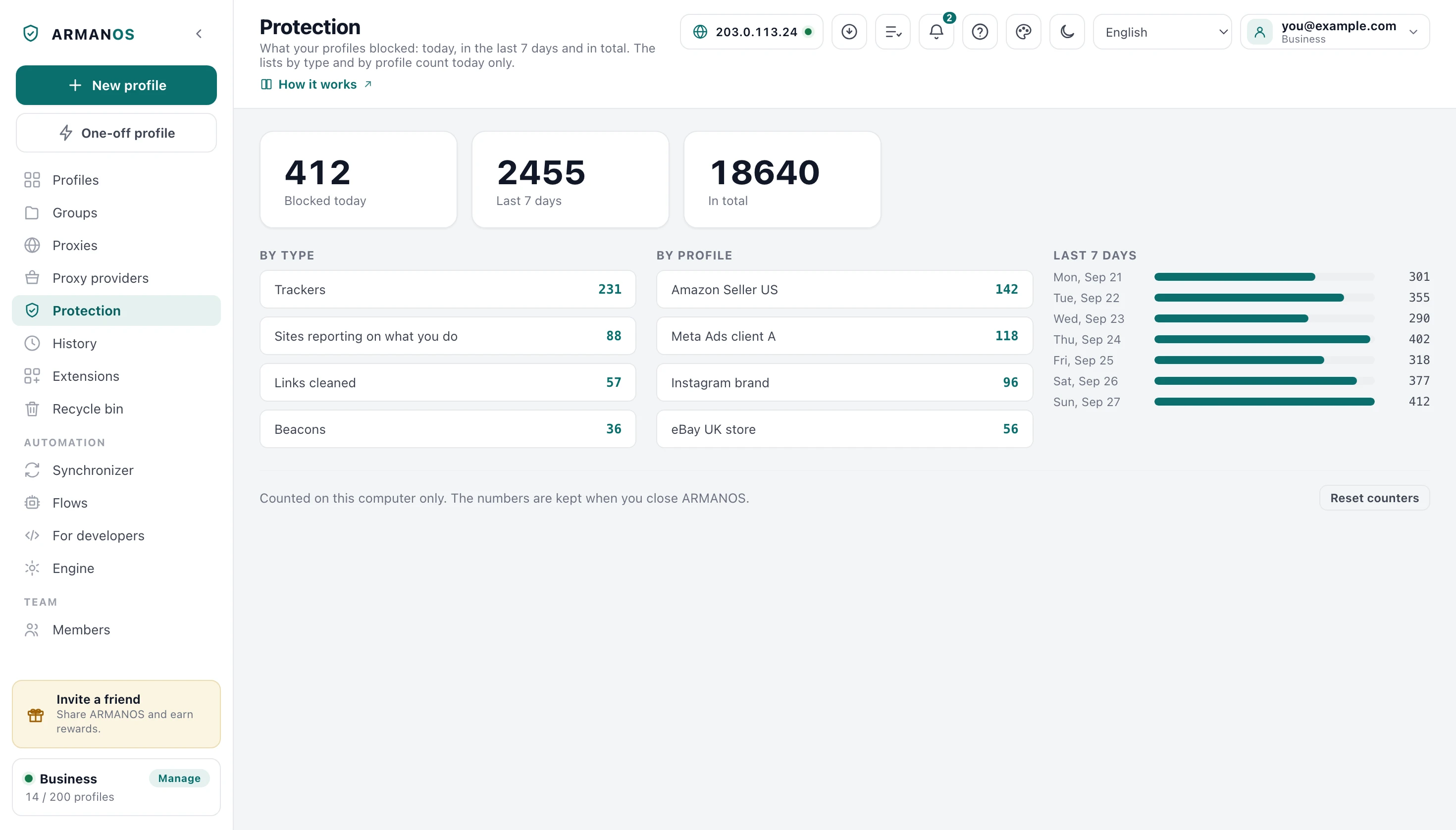
The Protection screen shows today, the last 7 days, the total, a breakdown by type and by the 12 profiles with the highest counts, and bars by day for the last 7 days. Reset counters wipes everything on this computer, and there is nothing to sync, because nothing was ever sent.
- Trackers
- requests to hosts on the merged list
- Sites reporting on what you do
- first party telemetry paths, whichever set matched
- Links cleaned
- navigations a parameter was stripped from
- Beacons
- suppressed beacon calls
- WebSocket tracking
- dropped read receipt and typing frames
You see the count on this computer only, and it stays when you close ARMANOS. While a page is open the counting runs without a break.
The built-in engine blocks less
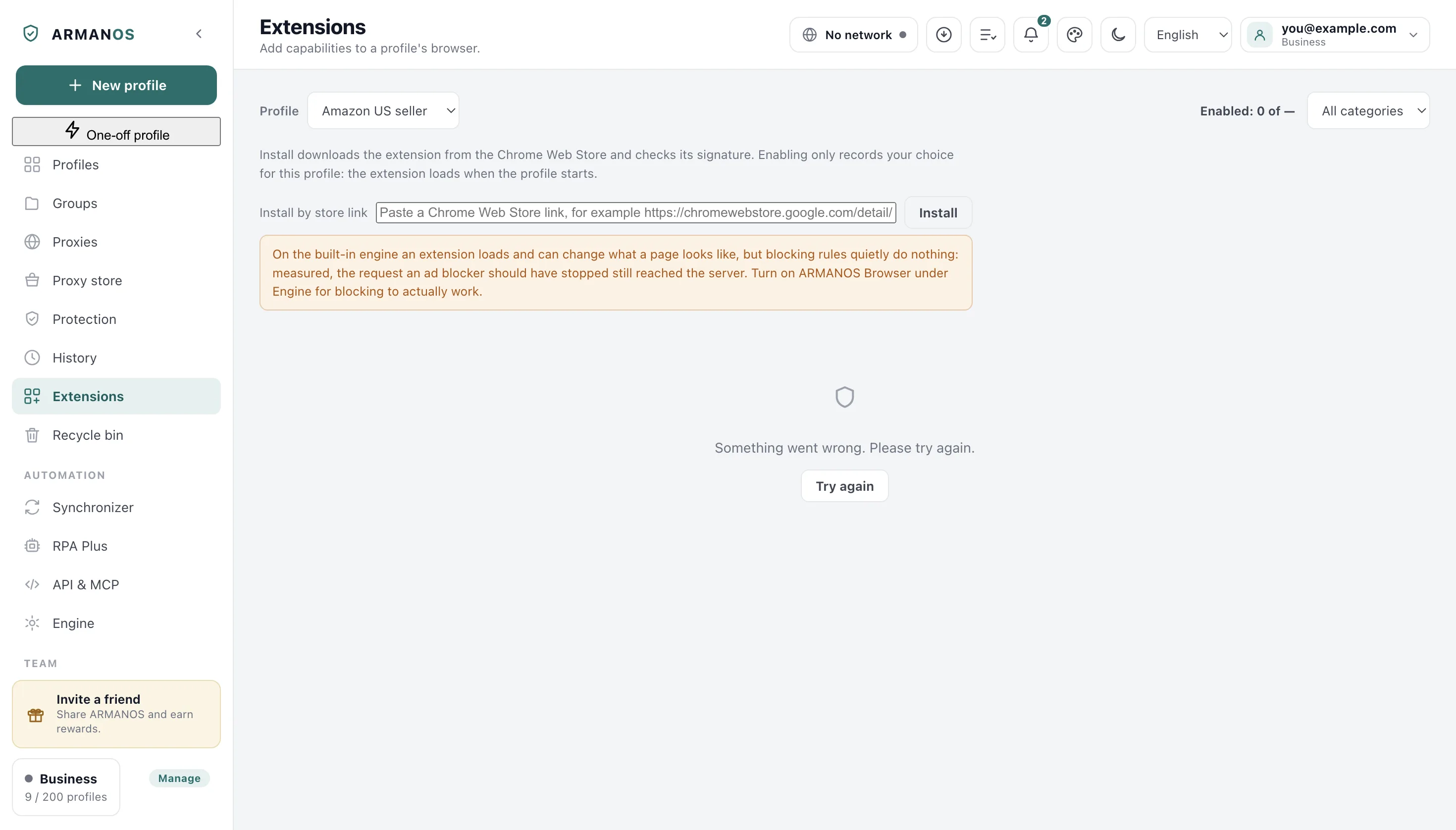
Measured with the same extension on both engines: on the built-in engine the request an ad blocker should have stopped reached the server, while ARMANOS Browser blocked it. A blocker installed there loads, but it has no button of its own, and by itself it stops nothing.
The app closes part of that gap itself. It takes the rules of the blocker you installed from that extension's own folder and runs them on its own, so blocking there does work after all.
What it will not do is pretend. A rule with its own regular expression, tab conditions or header conditions it marks as not understood and leaves alone, because applied without its condition it would block more than was asked and leave you with a white page.
What you do with it
Nothing here has a switch of its own. Everything follows from the scenario you pick for a profile: it selects the lists, the telemetry set and the page scripts, and the rest you get at launch.
- 1
Pick the scenario
Privacy gets the general list alone, Social adds the LinkedIn and social lists with both telemetry sets, and Ad accounts adds the ads list with host scoped console rules.
- 2
Turn on ARMANOS Browser
Blocking and cleaning work on both engines, but an installed blocker's own rules only run in full there. The build shipped today is 153.0.7978.0.
- 3
Work, then open Protection
A profile at zero after real browsing is telling you its engine or its scenario is not what you assumed.
- 4
Reset before a measurement
The reset is local and immediate, so you start a clean count on one machine without touching the server.
What this does not do
- This is not an ad blocker. The lists are correlation infrastructure, between 31 and 74 entries per scenario, so banners and sponsored posts keep showing.
- Sites you sign into still know you. A login is an identity you handed over yourself, and cutting third party callbacks does not take it back.
- The ad list spares ad consoles on purpose. Everything those consoles need to sign in, load, bill or answer their API is excluded, so working inside a console stays visible to the platform.
- The four lists ship inside the app and change with an app update. There is no subscription list that refreshes itself on a schedule.
How to check
Open the file, then the stand that guards it.
- Both engines answer the same way on every entry of the list, checked by running all of them
- apps/desktop/src/lib/tracker-rules.js · apps/desktop/test/движки-судят-список-одинаково.js
- On ARMANOS Browser the same rules become a per profile extension, measured live through a loopback proxy
- apps/desktop/src/lib/forkExtension.js · apps/desktop/test/блокировка-живьём.js
- The 40 stripped parameters live in one shared list used by both engines
- packages/shared/src/index.js · apps/desktop/test/блокировка-живьём.js
- An installed extension's rules are executed by the app on the built-in engine, and rules it cannot express are counted as skipped
- apps/desktop/src/lib/dnrBlock.js · apps/desktop/test/builtin-blocking.js
- The Extensions section warns if it does not see ARMANOS Browser selected and installed
- apps/desktop/src/manager/store.js · apps/desktop/test/extension-limits-honest.js
- A blocker you install does not switch off our own protection: both rule sets run
- apps/desktop/src/main/main.js · apps/desktop/test/расширение-не-снимает-защиту.js
Questions
- How is one list entry matched?
- A bare host name covers that host and its subdomains. An entry with a fragment of the address needs the same host and the start of the path, and both engines read it the same way.
- Why is a subdomain like a blog not blocked?
- Because anchored entries exist for exactly that. You lose the logging host, while a blog whose name merely starts the same way opens as usual.
- Can a page read the counters or the blocking rules?
- No. The counts go to a loopback address with a token drawn per profile, and the event name the two halves of the page scripts share is new at every launch.
- Do the counters survive a restart?
- Yes. They sit in a file on this computer, with 14 days of history there per day.
- What happens to rules the app cannot execute?
- They are counted and written to the log as not understood.
Read next
The ARMANOS engine
Where the network rules actually run, and what the built-in engine does instead.
Extensions
The catalog, per profile choices and the honest warning about the built-in engine.
Profiles
Where you choose the scenario, the lists and the page scripts for a profile.
Security
What stays on your computer, including these counters, and what reaches the server.
See it in your own profiles
Blocking, cleaning and the counters are on from the first profile you create.