Вашою мовою цієї сторінки поки немає. Ви читаєте англійський текст.
Comparisons
An exit address for every account
How the exit is set
Six ways to reach the network and what follows the address.
| How the exit is set | Clock and language follow | Different exits at once | Where addresses live | |
|---|---|---|---|---|
| Regular browser | Through system settings | Ні | One | In the system settings |
| Spoofing extension | Through the proxy setting in the browser | Declared in the page, after start | One | In the proxy setting of the browser |
| VPN | One tunnel per machine | Ні | One at a time | In the VPN app |
| Virtual machine | Set inside the guest | By hand, inside the guest | One per machine | Inside each guest |
| A device per account | A line or SIM of its own | By hand, on the device | One per device | On each device |
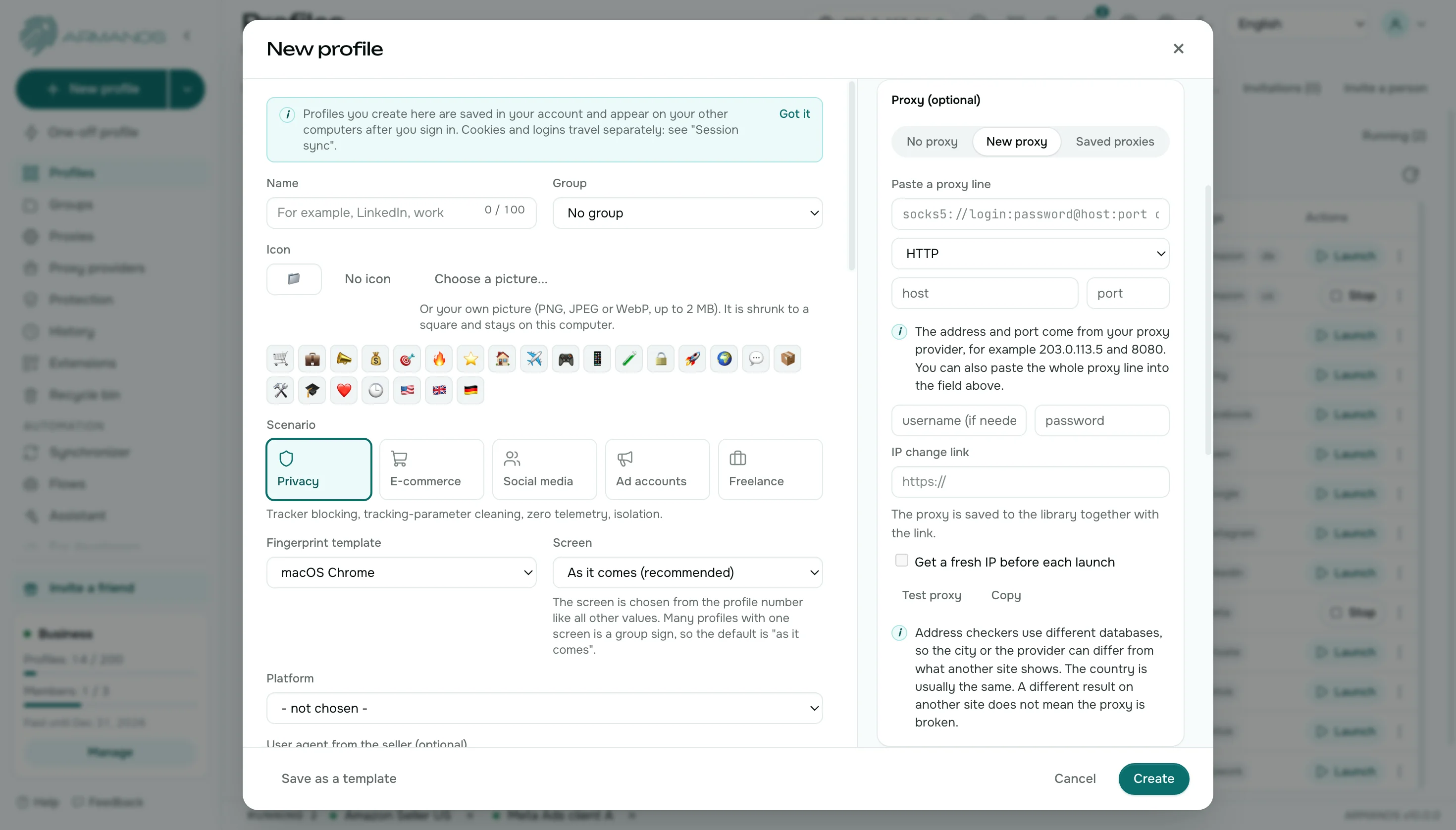
| ARMANOS | The proxy belongs to the profile | Follow the exit country | One per open profile | In the library: one entry per address |
Exit address
Regular browser and VPN
Through the system settings, or with one tunnel per machine.
ARMANOS
A proxy is tied to the profile. The same address works for all traffic of the profile. HTTP, HTTPS, SOCKS5 and your own server over SSH all work the same way in a profile.
Clock and language
Regular browser and VPN
The clock and language stay as on the machine.
ARMANOS
The time zone and language follow the exit country. A site sees an address and a clock that belong together.
Exit country
Regular browser and VPN
Which address sites see has to be checked separately.
ARMANOS
ARMANOS finds the country through the proxy itself. The Test proxy button shows the exit country and city.
Your own server
Regular browser and VPN
An exit through your own server is set up outside the browser.
ARMANOS
A server you already have becomes the exit of a profile over SSH. No separate proxy has to be bought for that profile.
Many addresses at once
Regular browser and VPN
One tunnel or one system setting serves every window, so accounts share an address.
ARMANOS
Every open profile holds an address of its own. Two profiles can use the same library entry or two different ones.
A library of proxies
Regular browser and VPN
Addresses live in a spreadsheet or in the settings of every browser.
ARMANOS
Paste a whole batch from a seller: ARMANOS reads many line shapes, counts repeats and stores each address once. The list shows how many profiles use it.
WebRTC
Regular browser and VPN
A page can ask the browser for the real address through WebRTC.
ARMANOS
A profile with a proxy does not show a site your real address through WebRTC. The free leak test shows which address a site sees. Name lookups on SOCKS5 go through the proxy as well.
Checking the address
Regular browser and VPN
You open a checker site and read the address it shows.
ARMANOS
The Connection check window shows the public address with country, city and provider, the response time, the name lookup, the clock and WebRTC. The start page of a profile shows the exit address too.
Changing the address
Regular browser and VPN
A system setting or a reconnect changes the exit for every window at once.
ARMANOS
Swap the address of one profile by hand, before launch, while the profile is open, or in rotation. The other profiles keep their own addresses.
What you get
The country through your proxy
The app finds the exit country through the proxy itself, so clock and language agree with it.
One address for all traffic
The same address serves both open and encrypted traffic of the profile.
Passwords stay off the command line
A proxy login stays off the launch line.
Your own server as an exit
Use a server you already have as the exit of a profile.
When to choose ARMANOS
Accounts need different addresses
One proxy per profile, not one exit for the whole machine.
Clock and language must match the country
The profile takes them from the exit country by itself.
You want a check before work
Press Test proxy before work and see where the profile exits.
Questions and answers
- How is the exit country found?
- Through your own proxy: the app asks location services in turn and takes the first clear answer.
- Does the proxy password reach the command line?
- No. Proxy credentials stay off the launch line, and other programs cannot read them.
- How many different addresses can I hold at once?
- One for every open profile.
- Can I use my own server as an exit?
- Yes. Over SSH, the server you already have becomes the exit of a profile.
- Which proxy types work in a profile?
- HTTP, HTTPS and SOCKS5 all work the same way, and so does your own server over SSH.
- Can I check what a site sees?
- Yes. The Connection check window and the free leak test show the address, the response time, the name lookup, the clock and WebRTC.