このページはまだお使いの言語では用意されていません。英語の文章をご覧いただいています。
Comparisons
One profile per account and a shared profile
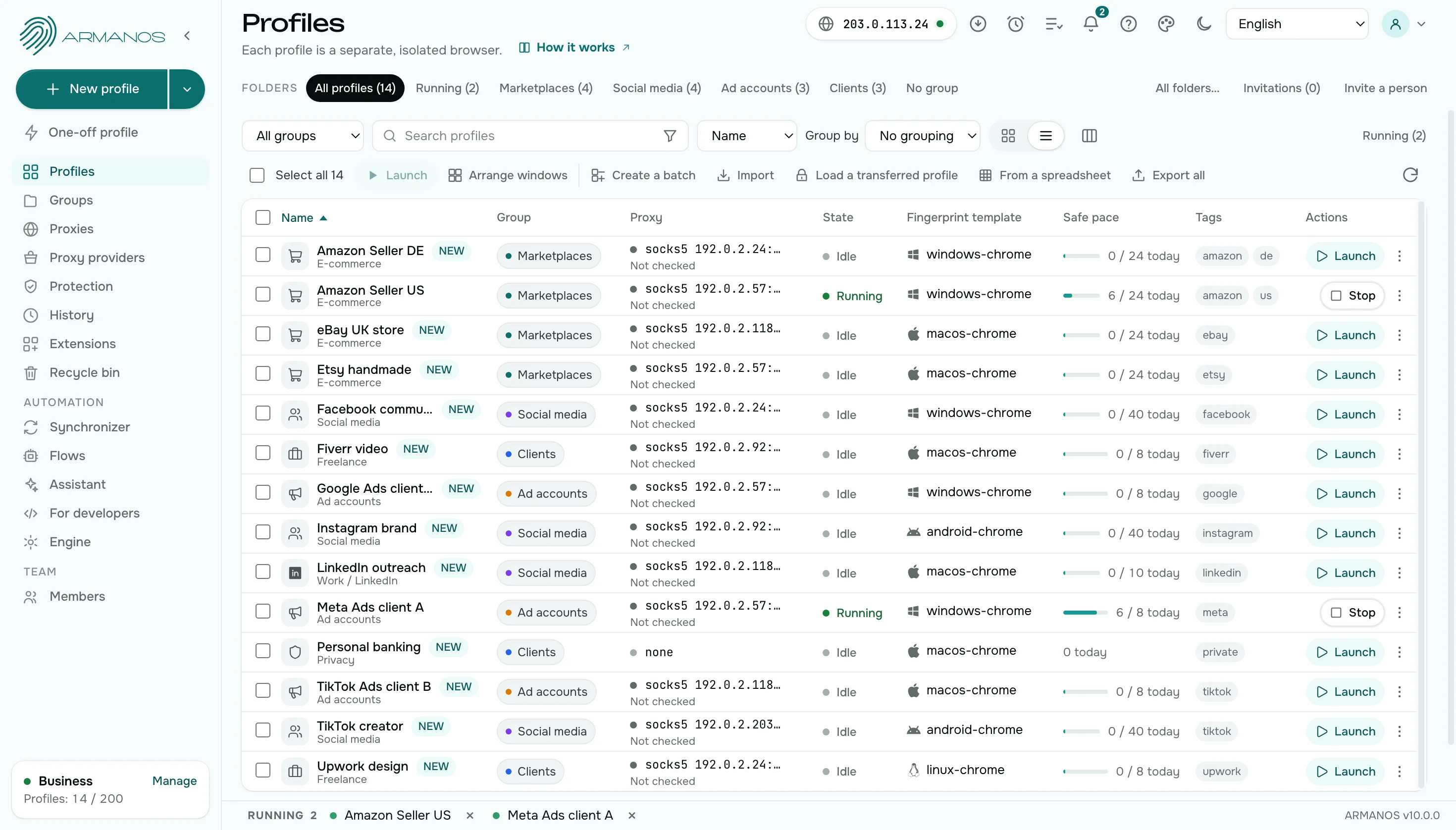
Comparison by point
Ten points where a shared profile ties accounts together.
| A shared profile | A profile per account in ARMANOS | |
|---|---|---|
| Losing an account | Drags the neighbors along | Touches only this account |
| Cookies and sign-ins | Shared | A directory of its own per profile |
| Device | One for all accounts | Its own in every profile |
| Exit address | One | A proxy per profile |
| Handing over to a colleague | A password is passed on | A profile is handed over or opened by role |
| Order | Everything in one list | Groups, tags, statuses and a search over seven places |
| Extensions | One set for every account | Per profile, from a catalog of 11 or your own from a store link |
| Bulk work | Account by account | 23 actions on a selection in one click |
| A deleted profile | Gone unless you made a backup | Restored from the bin until you delete it permanently |
| Notes about accounts | A spreadsheet next to the browser | Name, group, tags and status on the profile row |
Losing an account
Shared profile
Shared cookies and a shared device tie accounts together: losing one drags the neighbours along.
ARMANOS
Profiles stay apart: two profiles on one computer do not see each other. A loss touches one account only.
Handing over to a colleague
Shared profile
A colleague gets the password.
ARMANOS
Transfer to another account… hands the whole profile over, and a role opens it for your team without a password. The fingerprint, cookies, logins and proxy passwords reach a colleague together with the profile.
Order
Shared profile
Everything sits in one list.
ARMANOS
Groups, tags, statuses and search. One box searches seven places at once, and Filters narrow the list. Numbers in names sort as numbers, so profile 10 follows profile 9.
Extensions per profile
Shared profile
A shared profile keeps one set of extensions for every account inside it.
ARMANOS
Extensions are chosen per profile, so a tool for one account stays out of another. A profile remembers its enabled extensions and takes them along on a copy or a move.
A proxy per account
Shared profile
One profile means one address for every account inside it.
ARMANOS
Each profile points at its own entry of the proxy library, so every account reaches the site from its own address.
Name, group and status
Shared profile
Notes about accounts live in a spreadsheet next to the browser.
ARMANOS
Name, group, tags and status sit on the profile row, and filters narrow the list by them. Profiles can be named by a template with a number, a date or a random word.
Many accounts in one action
Shared profile
To change something for twenty accounts you open the shared profile twenty times.
ARMANOS
Select profiles and apply an action to all of them: launch, group, status, tags, proxy, extensions, password, new fingerprint. Before an important action ARMANOS names the profiles and asks you to confirm.
Another account like this one
Shared profile
A new account starts as a copy of everything the old one carried.
ARMANOS
Duplicate makes a copy with the same settings and its own fingerprint. The two-factor key and saved sign-in details are not copied, because they belong to one account.
What you get
Profiles that stay apart
Two profiles on one computer stay out of each other's sight.
Search among a thousand
One line searches seven places at once, and Filters narrow the same list.
Profile transfer
Transfer to another account… gives a profile to another person whole.
Bulk actions
Mark the profiles you need and apply an action in one click.
When to choose ARMANOS
You have more than a few accounts
Each in its own profile: order is kept by groups and tags.
The accounts belong to clients
One client, one group, one profile per account.
A team works with you
Access by roles, and passwords stay with the owner.
Questions and answers
- How many profiles can I create?
- How many profiles you run depends on your plan. The free plan gives two profiles with no time limit and no card.
- How do I find the right profile fast?
- One line searches seven places at once, filters narrow the list, and numbers in names sort as numbers.
- Can I act on several profiles at once?
- Yes. Tick the profiles you need and apply the action with one click.
- How do I give a client their accounts?
- Put the client profiles in one group and open the group to a member. The other profiles stay out of sight.
- Can I copy a profile?
- Yes. Duplicate makes a copy with the same settings and its own fingerprint, so two profiles do not share one device.
- Can I get a deleted profile back?
- Yes. A deleted profile waits in the bin until you delete it permanently.