यह पृष्ठ अभी आपकी भाषा में उपलब्ध नहीं है। आप अंग्रेज़ी पाठ पढ़ रहे हैं।
Knowledge base
Share a proxy with the team
One library per workspace
The proxy library lives in the account rather than on one computer, and there is one for the whole workspace.
A manager and above pull that library down to their own machine, so the same list is there. An operator or a member gets no pull at all: for them the addresses stay in the cabinet on the site.
Adding, editing, deleting an address and asking the seller for a new one belong to a manager and above. Someone below that is told plainly that their role does not allow it.
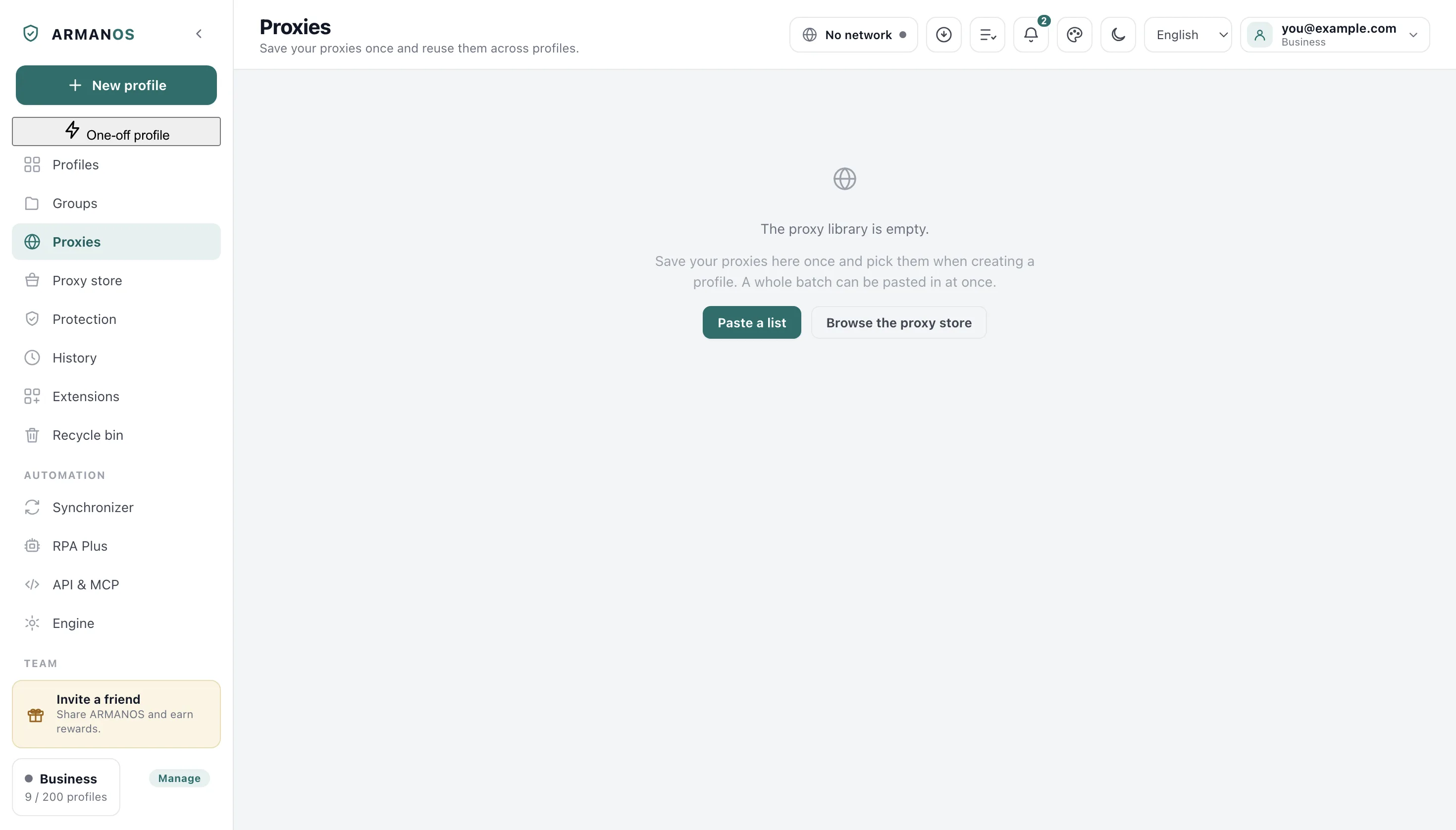
Put an address into the library
Nothing here is a separate team feature: the shared library is the same proxy library you already use.
- 1
Open the proxy library
The Proxies tab in the left column.
- 2
Add the address
The Add proxy button above the list.
- 3
Press Refresh from account
The button on the same tab, for a manager and above.
- 4
Attach it to a profile
The proxy picker inside that profile's window.
- 5
Open the profile to a colleague
Share with the team, in the profile's own menu.
The list carries no password
What comes back in the ordinary list of proxies is the address, the label and a plain statement that a password is set. The password itself is not in that answer.
The seller's IP change link is held back the same way, for the same reason: walking it costs money at the seller.
A password is handed out one at a time
Who gets a password at all
Below manager a password is handed over only for a proxy that sits behind a profile actually opened to that person. A profile they created themselves does not count, or the rule would come down to knowing an identifier.
The same rule decides which library proxy they can attach to a profile, their own included: one without a password, or one whose password is already theirs through a profile opened to them. Otherwise a profile of their own, opened to a colleague, would pass the password on.
A manager and above refresh the whole library in one signed in pull, and that pull is recorded as a single line with a count.
What a teammate can still do
Checking an address is open to everyone in the workspace, because a profile could not be launched otherwise.
Asking the seller for a new address is not: on a shared mobile proxy that one press would cut every colleague's live session and spend the seller's paid limit.
When someone leaves
Profiles a departing person takes with them lose the library address that stood behind them, matched by host, port and login.
So the working keys stay with the workspace that paid for them, and the person walks out with their own profiles rather than your traffic.
What this does not do
- It does not sell traffic. The library holds addresses the workspace bought elsewhere.
- It does not hide that a password exists: the server's answer with the proxy list says a password is set.
- It does not give a junior role the whole library. A refusal comes back rather than a shortened list pretending to be complete.
Where this is decided
Each claim above is one place in the code and one stand.
- The list has no password, a separate request hands one over, and the handover lands in the log
- apps/server/test/proxy-secret.js
- A junior role does not receive the passwords of the whole library, and the change link stays out of the list
- apps/server/test/proxy-delivery.js
- A teammate who does not run the library sends nothing up to it
- apps/desktop/test/proxy-library-sync.js
- The corporate address does not leave with a dismissed person's profiles
- apps/server/test/team-money-seats.js
- A junior role cannot pass a library password on through a profile of their own
- apps/server/test/пароль-пула-через-свой-профиль.js
Questions
- Can a teammate read the proxy password?
- A plain teammate cannot, not from the list: a password reaches their computer only for a proxy behind a profile opened to them, and the fact is written into the history log. A manager and above pull the whole library of passwords at once on a sync, and that is a line in the log too.
- Where do I see who took a password?
- On the History screen, under the line that says a proxy password was taken.
- Why can a colleague not change the IP of a shared proxy?
- Because it is one modem behind many windows. One press would drop every colleague's session and eat the seller's paid limit.
- Is the password kept in plain text on the server?
- No. It is sealed at rest, and the ordinary list never carries it out.
Try it on one address
The free plan gives two profiles, with no time limit and no card.