本頁面暫無您所用語言的版本,您正在閱讀英文原文。
Extensions
Extensions in two clicks
- 11 extensions
- Catalog
- Manifest V3 only
- Standard
- up to 50 enabled
- Per profile
- ARMANOS Browser 153.0.7978.0
- Where they really work
Eleven cards in the catalog
Open Extensions, choose a profile in the toolbar, and you get eleven cards. Each one carries a name, a version, a category and the folder name the app expects on disk.
The list ships inside the app, so the screen works before you sign in. Every entry carries the store id the Install button uses, and the official mark sits only on cards published by the extension's own author.
| Category | Cards | What people use them for |
|---|---|---|
| Privacy | uBlock Origin Lite, Privacy Badger | Cutting ads and trackers in one profile |
| Productivity | Dark Reader, Session Buddy | Night reading, saved sets of tabs |
| Wallets | MetaMask, Phantom | Web3 work in a profile of its own |
| Proxy | FoxyProxy | Per URL routing over the profile proxy |
| Developer | React Developer Tools, JSON Formatter | Debugging pages, reading API answers |
| Scraping | Web Scraper, Instant Data Scraper | Point and click collection into CSV |
The archive comes from the store
The Install button does the whole job: it takes the store id from the catalog and asks the store for the archive. The app stops downloading at 80 MB, so an endless answer cannot fill your disk.
Install checks the signature
Then the app checks the file before it lets anything move. It recomputes the extension id from the public key inside the archive, and that id has to equal the one you asked for.
- 1
Signature first
A missing signature, a bad signature or a mismatched id stops the install.
- 2
Name second
The name you see is the real one: the app compares the manifest name with the catalog name and skips the translated form.
- 3
Manifest V3 or nothing
A manifest that is not third generation stops the install with a plain reason instead of a green result.
- 4
The store id is kept
The app writes the author key from the archive into the manifest when the archive carries one, and then a wallet dialog looking for the known id finds it.
- 5
The swap is reversible
The app renames the old folder aside and removes it only once the new one is in place.
The choice belongs to the profile
The profile remembers an extension you switched on by folder name, in a file on this computer. When you are signed in the change to a catalog extension also goes to your account, so an extension you turned on at work is on at home on the same profile, while the choice of your own extension, added by link, by file or by hand, stays on this computer.
If that send fails you see the failure instead of a green Done, because on the second machine the choice would simply not exist.
An empty answer switches nothing off
In all the selected profiles at once
Tick profiles in the list or press Select all, then Extensions in the bar above the list. The window lists the catalog extensions and your own ones on this computer, says for each how many of the selected profiles already have it on, and gives two buttons: Switch on for all and Switch off for all. A catalog extension that is not on this computer yet is downloaded first by the first button.
The result stays in the same window in words: how many were switched on, how many already had it, which profiles hit the limit of 50 extensions and which ones the account did not take, by name. The profile history gets an entry with the extension name.
Profiles open on the built-in engine get it right away
The open profile's session is rebuilt the same way as at launch: the extension script runs on the page after it reloads, with no profile restart.
Profiles open in ARMANOS Browser get it at the next launch
An open ARMANOS Browser window does not switch extensions on the fly, so the bulk window names those profiles.
One request to the account per batch
The choice of a catalog extension goes to your account in one request, not one per profile, so a large batch does not run into the request rate limit and loses no profiles.
The same rights as for one profile
In the account a team member changes extensions on the profiles they have access to. The account does not take the rest, the window names them, and on this computer the choice is saved for them.
Manifest V3 only
Manifest V3 is the only standard that loads, at install and again at launch. Chromium 153 does not run the older one at all.
Silence would be worse than the refusal. Measured with a Manifest V2 folder handed to the engine: the browser started, the profile was marked running, the success notification arrived, and not a single page ever loaded.
So the app skips such a folder before launch, and a notification names the folder, the profile and the reason. Every card in the catalog is a third generation build, and every one of them you really can install from the store.
What loads at launch
A folder name arrives from your local choice and from your account, and it then becomes part of a path. That path never leads outside the extensions folder, so no one can slip your profile a foreign folder through a name.
On the built-in engine your profile takes these folders with file access turned off, because an extension with file access could read your other profiles' cookie and login databases. On ARMANOS Browser the profile takes the same folders as a list, and only what you enabled loads.
Switching off removes the extension when the list arrived
On the built-in engine an extension you switch off is removed from the profile without restarting the app.
A network blip unloads nothing
If the account list could not be fetched, what you enabled stays enabled: that answer means at least these rather than exactly these.
Up to 50 per profile
Beyond that the switch refuses and says why, instead of accepting a choice it would quietly ignore at launch.
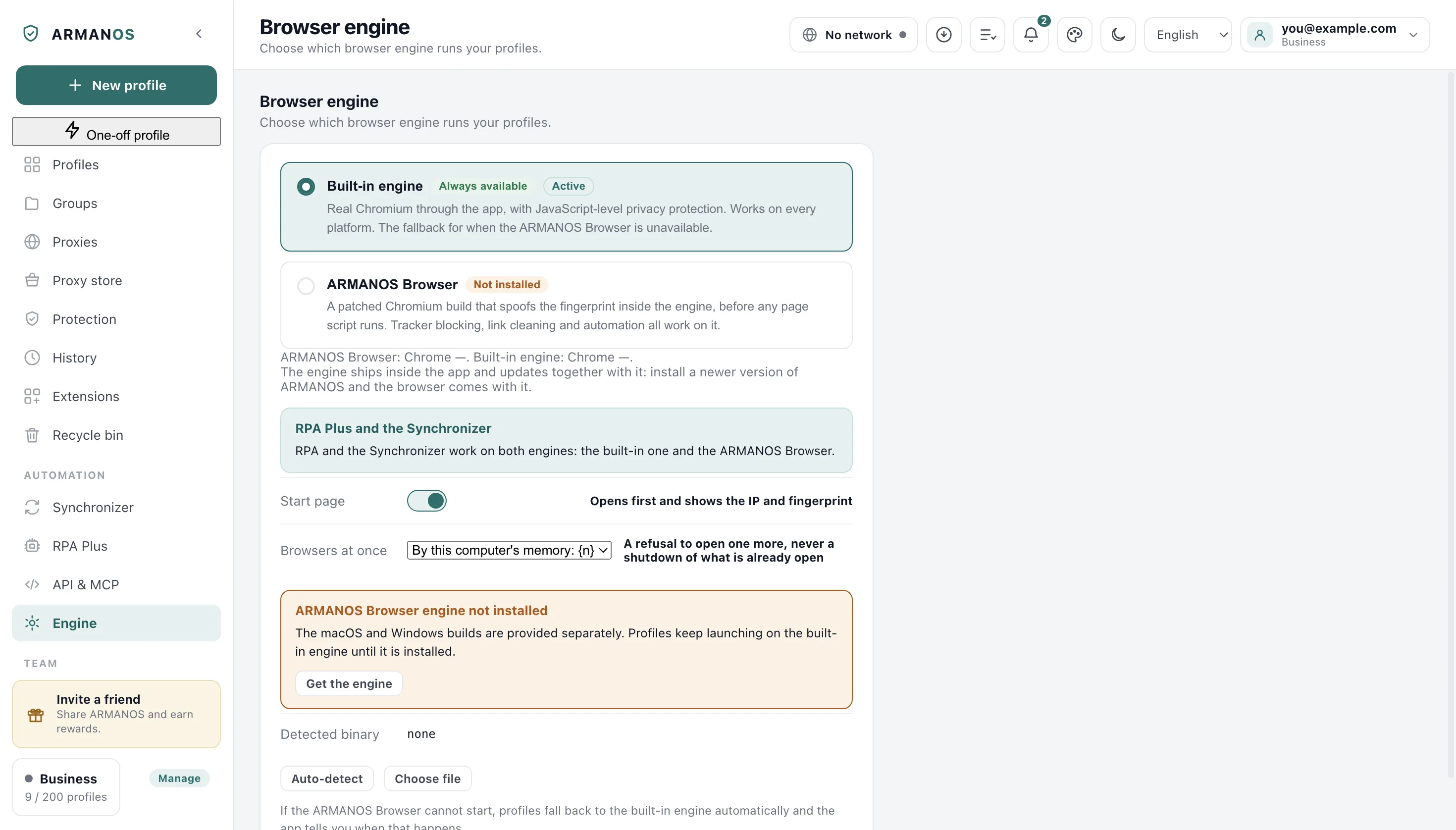
The built-in engine does less
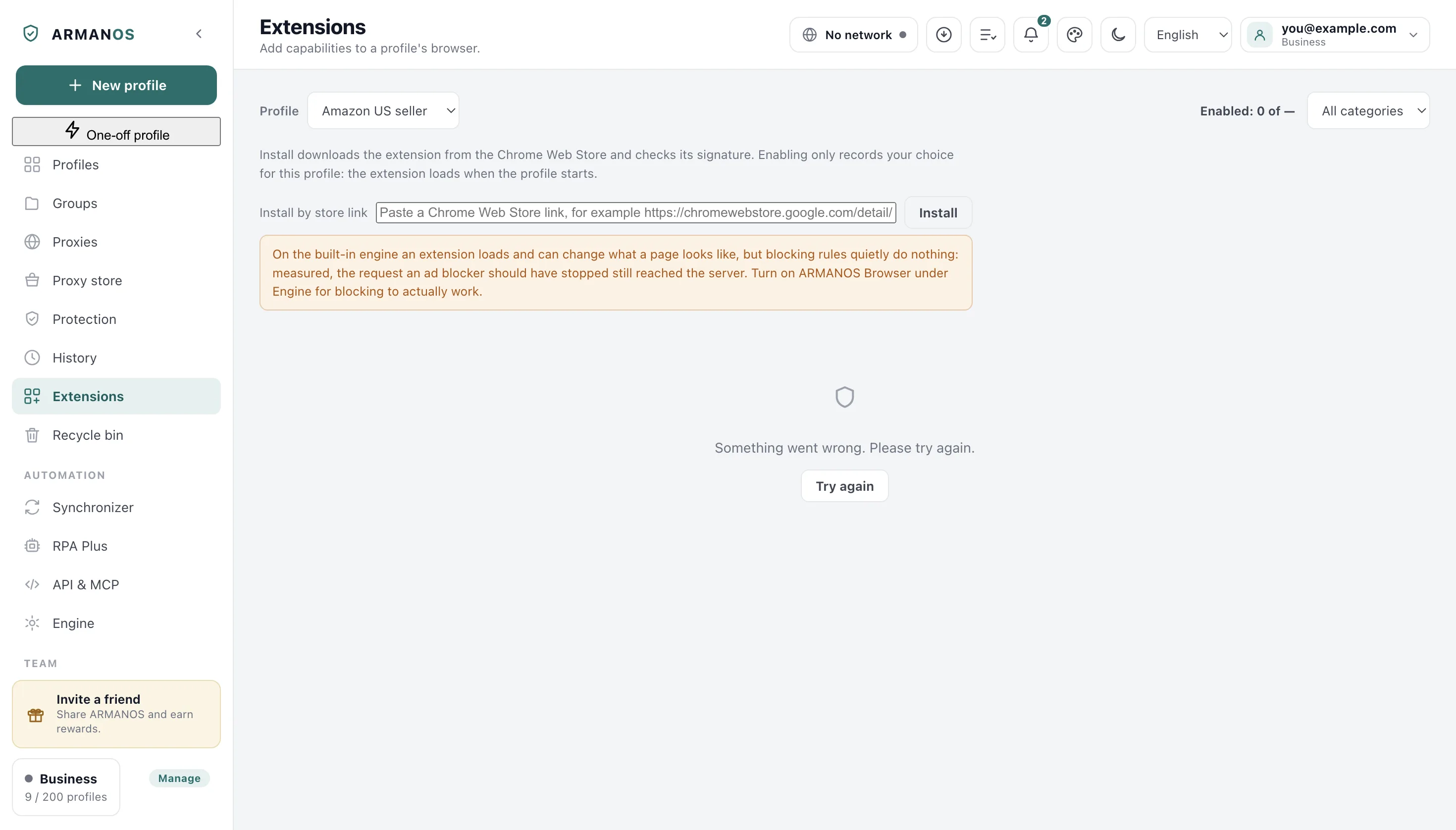
ARMANOS carries a built-in engine, ordinary Electron, used when ARMANOS Browser is not installed or cannot start. Store extensions load there and their scripts on pages run, but an extension has no button or window of its own, so a wallet or anything else you open from the toolbar cannot be used there.
Blocking is the one part the app can carry itself, and it does. It takes the rules of the blocker you installed from that extension's own folder and runs them.
- Built-in engine, Chromium 130
- the block rule did not fire, the request reached the server
- ARMANOS Browser 153.0.7978.0
- the same request was blocked
- Dark Reader on the built-in engine
- zero styles inserted, the page did not change
Measured on both engines with the same blocking rule, and separately with a real Dark Reader from the store. If the built-in engine ever starts blocking on its own, the warning comes off the screen.
The screen warns before you launch
The Extensions screen warns when the built-in engine is selected on the Engine screen, in all 22 languages. Choosing ARMANOS Browser without having installed it is the same case: your profile still starts on the built-in engine.
Your own extension folder
The extensions folder is printed on the screen with a button that opens it. Drop an unpacked extension into a folder named exactly as the badge on its card, then start the profile again.
For anything outside the eleven cards there is a link box: paste a Chrome Web Store link and the rest goes exactly as it does for a catalog card. The extension gets its own card, titled from its manifest, because files with no switch would just sit there.
Delete removes the folder, clears the choice from every profile that had it, and tells you how many that was, and when you are signed in, switching off a catalog extension reaches your account as well.
A downloaded extension file goes in through Install from a file (.crx or .zip).
Inside a profile, and kept current
In an open ARMANOS Browser profile you can press Add to Chrome in the Chrome Web Store, as in an ordinary browser. Once the profile closes, the Extensions screen lists what is installed inside it and where it came from.
The store extensions of the app update themselves. Every five hours one request asks the store, and a new version is installed when the profiles that hold it are closed.
What this does not do
- The catalog is eleven cards and there is no store search inside the app. Anything else you add by pasting a store link, by a .crx or .zip file or by dropping the files in yourself.
- Nothing is bundled with the app. An install from the catalog or by link downloads from the Chrome Web Store, so with no network there is no such install and the failure says so.
- On the built-in engine an extension has no button or window of its own. Its scripts on pages run, ARMANOS executes the blocking rules itself, and rules it cannot parse are counted, not applied.
- Manifest V2 extensions are refused at install and at launch. There is no compatibility layer and none is planned in this part of the product.
- The files live in one folder shared by every profile, so all profiles run the same version of an extension. Only the on and off choice, and the per profile ceiling of 50, belong to the profile. An extension installed inside a profile with Add to Chrome is the exception: it lives in that profile.
How to check
Open the file, then the stand that keeps it honest.
- The catalog is eleven entries, each with a store id, a version and a category, and each one really installs
- packages/shared/src/index.js · apps/desktop/test/catalog-installable.js
- The extension keeps its store id
- apps/desktop/src/main/main.js · apps/desktop/test/ext-keeps-store-id.js
- Enable says so when the choice did not reach the account
- apps/desktop/src/manager/store.js · apps/desktop/test/ext-choice-travels.js
- The folder name cannot escape the extensions directory
- apps/desktop/src/main/main.js · apps/desktop/test/extension-paths.js
- The built-in engine warning is shown exactly when the built-in engine will start, and it is measured, not assumed
- apps/desktop/src/manager/store.js · apps/desktop/test/extension-limits-honest.js
- An extension is switched on and off in 50 selected profiles at once: the choice reaches each one on this computer and in the account, a profile open on the built-in engine gets it without a restart, and one open in ARMANOS Browser is named as next launch
- apps/desktop/src/lib/расширения-пачкой.js · apps/desktop/test/расширения-пачкой-живьём.js
- A batch goes to the account in one request, lets in exactly the profiles a single switch would, and does not run into the rate limit
- apps/server/src/extensions/extensions.service.ts · apps/server/test/расширения-пачкой.js
Questions
- Do extensions travel with a copied profile?
- The list of enabled extensions does, both when you copy a profile and when you move it to another computer. The files stay local, so each machine keeps its own copy of them.
- What happens if an install fails halfway?
- The folder that was already there comes back. The app unpacks files into a temporary folder next to the target and leaves the old copy alone until the new one is in place.
- Which version does the store send?
- The app asks for the archive built for the major version of the engine you actually run, so an extension built for a newer Chromium never reaches an older one.
- Can two profiles run different versions of one extension?
- No. The files are shared by every profile on the machine, so there is one version for everyone and only the on and off choice differs.
- How do I see which extension a card really is?
- The card names the folder on disk and the version from the manifest, and the source link on it goes to the author, not to the store copy the Install button uses.
Read next
ARMANOS Browser
The Chromium 153 build where store extensions do what their cards say.
Profiles
What else belongs to a profile and travels with it.
Tracker blocking
The blocking that works without any extension at all.
Your session on two computers
How a profile and its choices reach the second computer.
Install an extension inside a profile
Add to Chrome in an open profile, and what the Extensions screen shows after.
Extension updates
When a new version lands and when it waits.
Put a blocker in the profile that needs one
The Free plan gives you two profiles, and the Extensions screen works without signing in.